> Generate text, images, video, audio, realtime voice, and embeddings with a single API. Use an OpenAI SDK by changing its base URL.
**Base URL:** `https://gen.pollinations.ai`
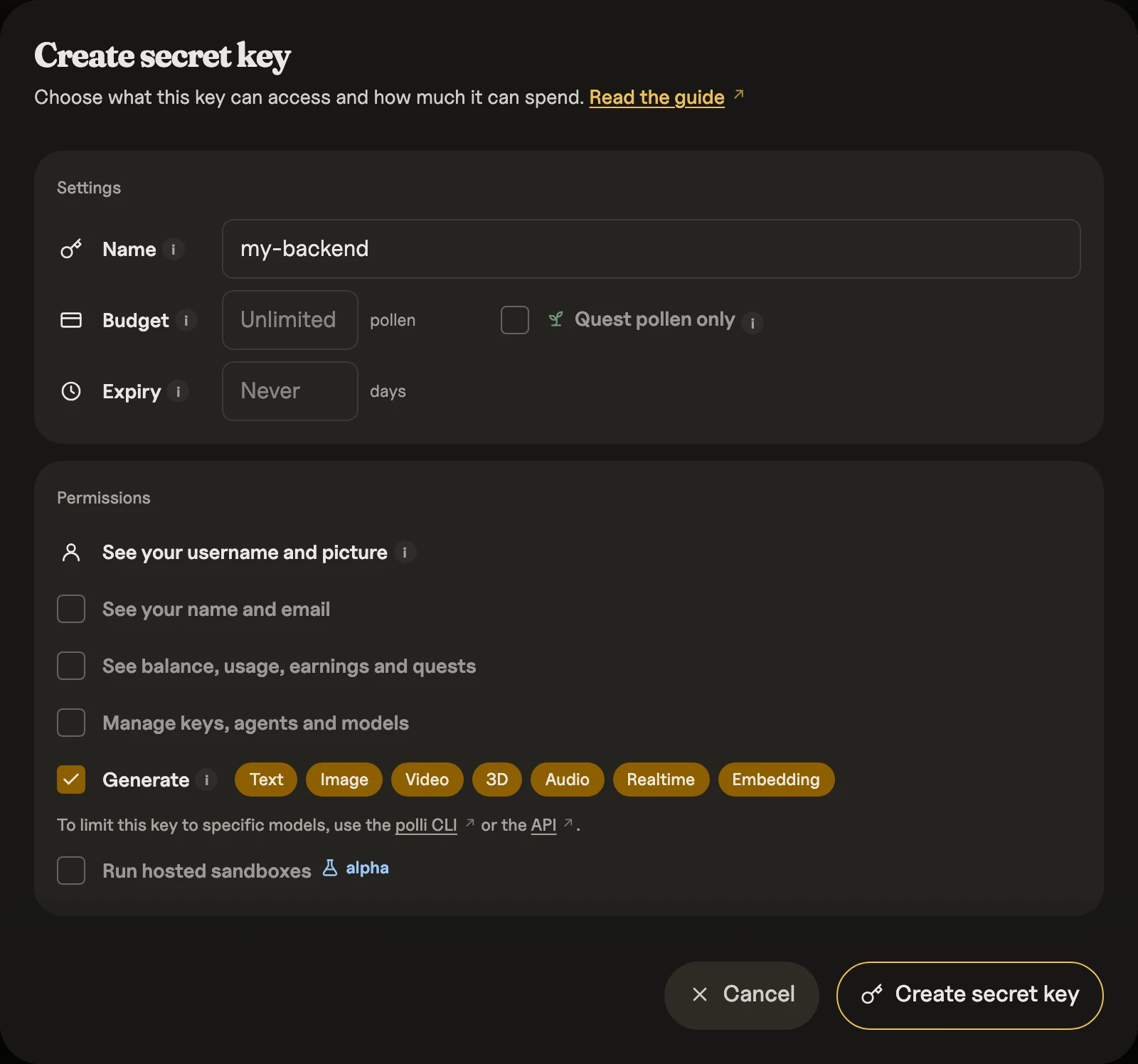
**Get your secret key:** [enter.pollinations.ai](https://enter.pollinations.ai/keys)
**Model catalog migration:** model IDs now use `publisher/model` names. Existing aliases remain valid in requests; match catalog entries against both their canonical ID and `aliases` when restoring saved selections. Catalog metadata uses `publisher` (for example, `OpenAI`) instead of `brand`; update clients reading that field. `publisher` identifies the model publisher, not the inference provider. The existing `brand_url` logo field is unchanged. See the [live model catalog](https://gen.pollinations.ai/models) for current IDs and aliases.
## Quick Start
### Text (Python, OpenAI SDK)
```python
from openai import OpenAI
client = OpenAI(base_url="https://gen.pollinations.ai/v1", api_key="YOUR_API_KEY")
response = client.chat.completions.create(model="openai/gpt-5.4-nano", messages=[{"role": "user", "content": "Hello!"}])
print(response.choices[0].message.content)
```
### Image (URL — no code needed)
```plaintext
https://gen.pollinations.ai/image/a%20cat%20in%20space?model=black-forest-labs/flux.1-schnell
```
### Audio (cURL)
```bash
curl "https://gen.pollinations.ai/audio/Hello%20world?voice=nova" \
-H "Authorization: Bearer YOUR_API_KEY" -o speech.mp3
```
### 3D (cURL)
```bash
curl "https://gen.pollinations.ai/3d/no_prompt_for_trellis_needed?image=https://inferenceport.ai/img/trellis.jpg&model=microsoft%2Ftrellis-2&resolution=low" \
-H "Authorization: Bearer YOUR_API_KEY" -o model.glb
```
### Embeddings (OpenAI-compatible)
```bash
curl https://gen.pollinations.ai/v1/embeddings \
-H "Authorization: Bearer YOUR_API_KEY" \
-H "Content-Type: application/json" \
-d '{"model":"openai/text-embedding-3-small","input":"Hello world","dimensions":512}'
```
See `GET /v1/models` for every text, image, audio, video, and embedding model available.
## Authentication
In the [interactive docs](https://gen.pollinations.ai/docs), select **Pollinations Connect** to authorize a docs key using your account. The consent screen defaults to a 5-Pollen spending cap and a 7-day expiry; both are editable. The approved key authenticates the request tester, and the account menu shows your profile and its remaining budget. Requests spend real Pollen from your wallet; the key's budget is a spending limit, not a separate balance.
The connection stays in the current browser tab. Copied examples contain `YOUR_API_KEY`; the docs add your connected key only when sending a request to a Pollinations API. Select **Disconnect** before entering a different key in the request tester. Disconnect clears this tab's connection; it does not revoke the key or disconnect other tabs. Revoke keys on the [Keys page](https://enter.pollinations.ai/keys). Each new consent creates a separate key that remains valid until expiry or revocation. Sandbox and account-management endpoints require their respective permissions; the default docs connection does not grant them.
Use a secret key from [enter.pollinations.ai](https://enter.pollinations.ai/keys) for generation requests. Model listing endpoints work without authentication.
| Type | Prefix | Use case | Rate limits | Description |
|------|--------|----------|-------------|-------------|
| Secret key | `sk_` | API requests | None | Personal secret keys stay out of browser code. Browser apps use a user-authorized secret key (`sk_`) from [Pollinations Pay](https://github.com/pollinations/pollinations/blob/main/BRING_YOUR_OWN_POLLEN.md). Secret keys have configurable model permissions, account permissions, and budgets. |
| App key (Pollinations Connect) | `pk_` | Client apps via OAuth / device flow | — | Publishable App Key used as the OAuth `client_id`. Users authorize; your app receives a scoped secret key (`sk_`). |
> **Note:** Since November 1, 2026, a `pk_` key only identifies your app; requests that send one get `401`. Frontend and mobile apps use **Pollinations Pay**, also called BYOP (Bring Your Own Pollen): register an App Key at [enter.pollinations.ai/keys](https://enter.pollinations.ai/keys), then run the OAuth authorization-code flow with PKCE (or the device flow) to obtain a temporary user-authorized secret key (`sk_`). The legacy fragment redirect and device flow remain supported.
Two ways to authenticate generation requests:
- Header: `Authorization: Bearer YOUR_API_KEY`
- Query param: `?key=YOUR_API_KEY`
For detailed integration guidance on user-pays authorization, including OAuth discovery and token exchange, see [Pollinations Pay](https://github.com/pollinations/pollinations/blob/main/BRING_YOUR_OWN_POLLEN.md).
To buy a prepaid API key with USDC without a Pollinations account, see [x402 Prepaid Keys](https://gen.pollinations.ai/docs#tag/x402-prepaid-keys).
## x402 Prepaid Keys
Buy a prepaid API key with USDC on Base, without creating a Pollinations account. Choose any amount from $0.01 to $10,000 in cents; the key receives the same amount of Pollen.
1. `GET https://enter.pollinations.ai/api/x402/keys/0.50` requests a $0.50 key. `POST` works too. The first response is `402` with payment terms in `PAYMENT-REQUIRED`.
2. Use an x402-capable wallet or client to sign those terms, then retry the same request with `PAYMENT-SIGNATURE`. The response contains the secret `key` and its `pollen` budget.
3. Send `Authorization: Bearer ` to normal `gen.pollinations.ai` generation endpoints. Check the key's remaining budget at `GET https://gen.pollinations.ai/account/balance`.
Each payment creates a new key. Keep it secret. `GET https://enter.pollinations.ai/api/x402/keys` lists preset amounts; you can also put your own amount in the URL.
## Text Generation
Generate text using OpenAI-compatible Chat Completions and stateless Responses APIs. Use an OpenAI SDK by changing its base URL.
| Endpoint | Best for |
|----------|----------|
| `POST /v1/chat/completions` | OpenAI compatibility: streaming, tools, vision, structured outputs |
| `POST /v1/responses` | Stateless Responses input/output items, semantic streaming events, and function tools |
| `POST /v1/messages` | Anthropic Messages API for Claude Code and the Anthropic SDKs |
| `GET /text/{prompt}` | Simple GET for prototyping; returns plain text |
**Available models:** stealth/glyph-cluster, openai/gpt-5.4-nano, openai/gpt-5-nano, openai/gpt-oss-20b, openai/gpt-4o-mini, openai/gpt-5.3-codex, openai/gpt-5.4, openai/gpt-5.4-mini, openai/gpt-5.5, openai/gpt-5.6-sol, openai/gpt-6.1-terra, openai/gpt-5.6-terra, openai/gpt-5.6-luna, openai/gpt-6-astra, openai/gpt-6-sol, openai/gpt-6.1-sol, openai/gpt-6-luna, inception/mercury-2, inception/mercury-2.5-preview, inception/mercury-3, cohere/command-a-plus, qwen/qwen3-coder-30b-a3b-instruct, mistralai/mistral-small-3.2, mistralai/mistral-small-4, openai/gpt-audio-mini, openai/gpt-audio-1.5, google/gemini-3-flash-preview, google/gemini-3.7-flash, google/gemini-3.8-flash, google/gemini-4-argon, google/gemini-3.5-flash-lite, google/gemini-2.5-flash-lite, deepseek/deepseek-v4-flash, deepseek/deepseek-v4.1-flash, deepseek/deepseek-v4.1-flash-1017, deepseek/deepseek-v4-flash-vision-exp, google/gemma-4-26b-a4b-it, google/gemma-4-31b-it, deepseek/deepseek-v4-pro, x-ai/grok-4.20, x-ai/grok-4.3, x-ai/grok-4.6, x-ai/grok-4.7, google/gemini-2.5-flash-lite:search, vllm-sr/d3, respan/span-01-lite, typesafe/jev-1.14, jaredpalmer/kev-4b, perplexity/pplx-decider-v1.2, liquid/d1, inferenceport-ai/lightning-text-v2.1, inferenceport-ai/lightning-text-v2, microsoft/microsoft-decision-1, openai/gpt-6-luna-decisions, pollinations/midijourney, pollinations/midijourney-large, anthropic/claude-haiku-4.5, anthropic/claude-haiku-5.5, anthropic/claude-sonnet-4.6, anthropic/claude-sonnet-5, anthropic/claude-sonnet-5.5, anthropic/claude-opus-4.6, anthropic/claude-opus-4.7, anthropic/claude-opus-5, anthropic/claude-opus-5.5, anthropic/claude-opus-5.5:fast, anthropic/claude-fable-5, anthropic/claude-fable-5.1, perplexity/sonar, moonshotai/kimi-k2.6, moonshotai/kimi-k2.7-code, moonshotai/kimi-k3.1-pro, moonshotai/kimi-k3, moonshotai/kimi-k3.1-pro-highspeed, poolside/laguna-s-2.1, tencent/hy4-preview, tencent/hy3, inclusionai/ling-3.1-flash, nex-agi/nex-n2.5-mini, nex-agi/nex-n2.5-pro, inclusionai/ling-3.0-flash-vl, meituan/longcat-2.0, thinkingmachines/inkling-small, thinkingmachines/inkling, nvidia/nemotron-3-ultra, nvidia/nemotron-3.5-lightning, nvidia/nemotron-3.5-super-vl, xiaomi/mimo-v2.5, xiaomi/mimo-v2.5-pro, xiaomi/mimo-v2.6-flash, xiaomi/mimo-v2.6-pro, google/gemini-3.1-pro-preview, amazon/nova-micro-v1, amazon/nova-2-lite-v1, z-ai/glm-5.2, z-ai/glm-5.3, z-ai/glm-5.3-flash, z-ai/glm-5.3-flashx, meta/llama-3.3-70b-instruct, meta/llama-4-maverick, meta/llama-4-scout, minimax/minimax-m2.7, minimax/minimax-m3, minimax/minimax-m3.1-flash, meta/muse-glimmer-30b, meta/muse-spark-1.2, meta/muse-spark-1.3, meta/muse-spark-open, meta/muse-wonder-1.0, mistralai/mistral-large-4, mistralai/mistral-large-3, qwen/qwen3-coder-next, qwen/qwen3.7-plus, qwen/qwen3.7-max, qwen/qwen3.8-2.4t-a95b, qwen/qwen3.8-27b, qwen/qwen3.8-max, qwen/qwen3.8-max-0902, qwen/qwen3.8-flash, qwen/qwen3.7-flash, qwen/qwen3-vl-30b-a3b-instruct, qwen/qwen3-vl-235b-a22b-thinking, stepfun/step-5-preview, stepfun/step-3.7-flash, stepfun/step-3.5-flash, qwen/qwen3guard-gen-8b
### Caller-selected fallbacks
Set `model` to a comma-separated list of up to four model IDs or aliases, such as `"model-a,model-b,model-a"`. Models are tried in the supplied order on retryable upstream failures; repeated entries request separate attempts. All entries must have the same model category and support the requested endpoint. Listed alternatives excluded by the API key's permissions are skipped. List requests are cached per API key or signed-in session user because their alternatives depend on that caller’s permissions and budget.
An explicit list replaces each model's configured fallback routes. The model that serves determines the price and whether Paid Pollen is required; balance checks, key budgets and rate limits apply before its attempt. A single-model request keeps its configured fallback routes and original pricing rules. Find model IDs, categories and supported endpoints in [`GET /v1/models`](https://gen.pollinations.ai/v1/models).
### Responses API
Every text model that lists `/v1/chat/completions` in `supported_endpoints` from [`GET /v1/models`](https://gen.pollinations.ai/v1/models) or [`GET /text/models`](https://gen.pollinations.ai/text/models) also lists `/v1/responses`. Models with a Responses upstream (configured built-in providers, community models and endpoint agents registered with a Responses URL, managed prompt agents) call it directly. All other text models, including community models registered with Chat Completions, run each Responses request through the Chat Completions pipeline and translate the answer back, with the same billing, key permissions, safety, rate limits, caching and fallback as Chat Completions.
```bash
curl https://gen.pollinations.ai/v1/responses \
-H "Content-Type: application/json" \
-H "Authorization: Bearer $POLLINATIONS_API_KEY" \
-d '{
"model": "openai/gpt-5.4-nano",
"input": "Explain why the sky is blue in two sentences.",
"store": false
}'
```
The endpoint is deliberately stateless. `store` must be `false`; `previous_response_id`, `conversation`, and `prompt` must be null or omitted; `background` must be false or omitted; and `item_reference` input items are rejected. To keep reasoning across turns, request `include: ["reasoning.encrypted_content"]` and send the returned reasoning items back in `input`; models without a Responses upstream ignore them. Streaming uses Responses event names and terminal usage events. Direct models preserve the provider's terminal marker; managed-agent streams add one `data: [DONE]` marker. For text models, missing or malformed usage on a completed or incomplete response fails the request. Failed responses may report null usage. These failed requests are not billed, but completed child model calls and charged MCP operations within an agent run remain billable; the outer agent request adds no charge.
The stateless surface follows the OpenAI Responses API and OpenResponses item/event vocabulary. It does not claim full OpenResponses conformance: persisted continuation, conversations, compaction, background jobs, Responses WebSocket transport, and normalization of every direct provider stream are outside this subset.
Community text models and endpoint agents declare one upstream API and one exact URL. A Responses registration accepts both public APIs: Responses requests use the selected endpoint directly, while Chat Completions requests use the shared stateless adapter. A Chat Completions registration accepts both too: Responses requests run through its Chat Completions URL. Built-in models can have separate routes for the two public APIs; advertising Responses does not mean their Chat requests use the adapter.
On models served through Chat Completions, Responses supports text and image input, function tools and their outputs, `tool_choice`, `text.format` (JSON object and JSON schema), `reasoning.effort`, and streaming. Provider reasoning returns as `reasoning` items with `reasoning_text` content. `max_tool_calls`, `truncation: "auto"`, `top_logprobs`, logprob includes and hosted tools return HTTP 400. Streams end with `data: [DONE]` after the terminal event; a provider error or missing usage ends the stream with `error` and `response.failed`.
Managed prompt agents run configured MCP tools on the server. Send previous response items back to continue a conversation; completed tools are not run again.
Managed prompt agents accept `reasoning.effort` (Responses) and `reasoning_effort` (Chat Completions). Reasoning summaries are not supported: a non-null `reasoning.summary` returns HTTP 400.
### Anthropic Messages API
Every text model that supports Chat Completions also accepts Anthropic Messages requests and lists `/v1/messages` in `supported_endpoints`. Point Claude Code or an Anthropic SDK at `https://gen.pollinations.ai` and authenticate with a bearer token:
```bash
export ANTHROPIC_BASE_URL=https://gen.pollinations.ai
export ANTHROPIC_AUTH_TOKEN=$POLLINATIONS_API_KEY
export ANTHROPIC_MODEL=openai/gpt-5.4-nano
claude
```
```python
import os
import anthropic
client = anthropic.Anthropic(
base_url="https://gen.pollinations.ai",
auth_token=os.environ["POLLINATIONS_API_KEY"],
)
message = client.messages.create(
model="openai/gpt-5.4-nano",
max_tokens=1024,
messages=[{"role": "user", "content": "Hello"}],
)
```
```typescript
import Anthropic from "@anthropic-ai/sdk";
const client = new Anthropic({
baseURL: "https://gen.pollinations.ai",
authToken: process.env.POLLINATIONS_API_KEY,
});
const message = await client.messages.create({
model: "openai/gpt-5.4-nano",
max_tokens: 1024,
messages: [{ role: "user", content: "Hello" }],
});
```
Requests run as Chat Completions requests: balance checks, key permissions, rate limits, caching and billing are the same. Streaming, tools, images, PDF documents (base64 `document` blocks, sent as Chat `file` parts), system prompts and stop sequences depend on the selected model's capabilities; see [`/text/models`](https://gen.pollinations.ai/text/models). `cache_control` uses the same provider support as Chat Completions (see Prompt caching below); custom cache TTLs are not supported. `thinking` sets `reasoning_effort` (`output_config.effort` for adaptive thinking), and provider reasoning returns as `thinking` blocks. Usage reports `input_tokens`, `output_tokens`, `cache_read_input_tokens` and `cache_creation_input_tokens`; a response without provider usage fails, and a stream ends with an `error` event. Errors use Anthropic's error shape. `/v1/messages/count_tokens`, batches, files, server tools and `x-api-key` authentication are not supported.
Claude Code sends `cache_control` automatically. Fireworks-hosted models that reject this field cannot currently be used with Claude Code; see [the compatibility issue](https://github.com/pollinations/pollinations/issues/15682).
### Media models in conversations
Image, video, audio and 3D models that advertise these endpoints in [`/models`](https://gen.pollinations.ai/models) accept a text prompt. Only the last user message is used; history, instructions and text-generation settings are ignored. Its text parts (or a string Responses `input`) form the prompt. Image parts (`image_url` in Chat, `input_image` in Responses, as URLs or data URIs) are the source images of image models and the start frame of video models that list `image` under `input_modalities`, exactly as `/v1/images/edits` does; other models, including 3D, return HTTP 400 for them, and any other attachment type returns HTTP 400. Use the native media endpoints for generation settings.
Base64 PDFs go in a Chat `file` part: `file.file_data` as a `data:application/pdf;base64,...` URI, or raw base64 with `file.mime_type: "application/pdf"`. Claude models on Bedrock, OpenAI models on Azure/OpenAI (including those served through the Responses API) and Gemini models read them; an optional `file.filename` (or `file.file_name`) is passed to OpenAI as the filename. Models without `image` under `input_modalities` return HTTP 400 for file parts, except on OpenRouter, which parses PDFs to text for any model. A `/v1/messages` base64 `document` block takes the same path.
Text models with `video` under `input_modalities` (for example `inclusionai/ling-3.0-flash-vl`) accept `video_url` parts the same way they accept `image_url`: a public `https://` URL or a `data:video/...;base64,...` data URI (Gemini models also accept YouTube and `gs://` URLs). Video usage is metered from the provider's reported `video_tokens` detail and billed against the model's video prompt rate.
Empty prompts, malformed Unicode and prompts consisting only of `.` or `..` return HTTP 400. Reference-required models return their normal missing-input error.
Dialogue models expect one `: ` turn per line, just like `/audio`. Community speech models available only through `/v1/audio/speech` are not included.
```bash
curl https://gen.pollinations.ai/v1/responses \
-H "Authorization: Bearer $POLLINATIONS_API_KEY" \
-H "Content-Type: application/json" \
-d '{"model":"black-forest-labs/flux.1-schnell","input":"A lighthouse at dawn"}'
curl https://gen.pollinations.ai/v1/chat/completions \
-H "Authorization: Bearer $POLLINATIONS_API_KEY" \
-H "Content-Type: application/json" \
-d '{"model":"black-forest-labs/flux.1-schnell","messages":[{"role":"user","content":"A lighthouse at dawn"}]}'
```
Both return assistant text: a Markdown image embed for images, or a Markdown link for audio, video and 3D, followed by the plain public file URL. The URL is also in the `Link` header. With `stream: true`, events arrive after generation finishes.
Media uses its normal billing units, not text tokens: Responses returns `usage: null`; Chat JSON omits `usage`. Chat streaming chunks contain `usage: null`, with no final usage chunk. Video uses the native model or provider's default duration.
### Reasoning
Use `reasoning_effort` to control reasoning on models that advertise reasoning support.
```bash
# POST /v1/chat/completions — OpenAI-compatible response
curl https://gen.pollinations.ai/v1/chat/completions \
-H "Content-Type: application/json" \
-H "Authorization: Bearer $POLLINATIONS_API_KEY" \
-d '{
"model": "openai/gpt-5.4-nano",
"reasoning_effort": "high",
"messages": [
{ "role": "user", "content": "Prove that there are infinitely many prime numbers." }
]
}'
```
```bash
# POST /text — plain-text response
curl https://gen.pollinations.ai/text \
-H "Content-Type: application/json" \
-H "Authorization: Bearer $POLLINATIONS_API_KEY" \
-d '{
"model": "openai/gpt-5.4-nano",
"reasoning_effort": "medium",
"messages": [
{ "role": "user", "content": "Design a URL shortener. Outline the key tradeoffs." }
]
}'
```
### Prompt caching
On Gemini, Claude, and Nova models, a large static prompt prefix can be cached so repeat requests bill it at a fraction of the input rate. Mark the end of the static prefix with `cache_control` on a content block (not on the message); everything before the marker must be byte-identical across requests, everything dynamic goes after. The first request creates the cache (`usage` reports `cache_creation_input_tokens`); repeat requests within the TTL report `prompt_tokens_details.cached_tokens` at the discounted rate.
```json
{
"model": "google/gemini-2.5-flash-lite",
"messages": [
{
"role": "system",
"content": [
{
"type": "text",
"text": "",
"cache_control": { "type": "ephemeral" }
}
]
},
{ "role": "user", "content": "" }
]
}
```
**Gemini:** The prefix must be at least ~2,048 tokens (~4,096 on Gemini 3 models). Requests with tools, including built-in tools, are not cached. This means `google/gemini-3.7-flash`, `google/gemini-3-flash-preview`, `google/gemini-3.1-pro-preview`, and the search variants only cache when tools are disabled (`"tools": []`) or a JSON `response_format` is set; `google/gemini-2.5-flash-lite` and `google/gemini-3.5-flash-lite` cache by default. Cache creates bill at the standard input rate plus a storage fee for the 1-hour TTL ($1 per 1M cached tokens on Flash models, $4.50 on Pro); hits bill at ~10% of input. The storage fee means caching pays off only when the prefix is reused often: roughly a dozen reuses per hour on the cheapest models.
**Claude:** All Claude models cache. The prefix minimum varies by model: 512 tokens on `anthropic/claude-fable-5`, `anthropic/claude-fable-5.1`, and `anthropic/claude-opus-5`, and 1,024 on `anthropic/claude-sonnet-4.6`; other models have higher minimums. Tool definitions are cacheable. `anthropic/claude-fable-5.1` accepts only automatic or disabled tool choice; forcing any or a named tool returns a 400. Cache creates bill at 1.25× the input rate (no storage fee); hits bill at 10% of input, or 2.5% on `anthropic/claude-fable-5.1`. The cache lives ~5 minutes, refreshed on each hit.
**Nova:** `amazon/nova-2-lite-v1` and `amazon/nova-micro-v1` cache. The prefix must be at least ~1,000 tokens (up to 20K tokens cacheable). Cache creates are free; hits bill at 25% of input. ~5-minute TTL.
Models that advertise `/v1/responses` also accept OpenAI's cache controls. Set `prompt_cache_options.mode` to `explicit` and place `prompt_cache_breakpoint: { "mode": "explicit" }` on the content block ending each stable prefix (up to four). Chat requests adapted to Responses preserve these markers; the existing `cache_control: { "type": "ephemeral" }` marker is translated to the same explicit breakpoint. Managed prompt agents apply an explicit request without caller markers to their configured static prompt.
### Typed decisions (`typesafe/jev-1.14`)
`typesafe/jev-1.14` (aliases `jev`, `typesafe/jev`, and `typesafe/jev-1.13`) returns calibrated judgments instead of free text. Post `state` and a map of `questions` to `POST /alpha/decisions`; each question is a `choice`, `score`, or `noul`, and each is answered independently under the key you supplied. `model` defaults to `jev`. `POST /v1/systemone`, TypeSafe's own path, takes the same request and returns the same response, so clients that append `/v1/systemone` to a base URL work with `https://gen.pollinations.ai`.
```json
{
"state": "My payouts have been failing for 3 days.",
"questions": {
"department": {
"type": "choice",
"instructions": "Which team should handle this?",
"criteria": { "billing": "Payment issues", "technical": "Product failures" }
},
"is_urgent": { "type": "noul", "instructions": "Does this convey urgency?" }
}
}
```
The response carries `answers`, one field per question, each with `type` and its native fields (`choice` + `confidence` + `probabilities`, `score` + `legend` + `confidence` + `probabilities`, or `noul`), plus `usage` with `input_tokens` and `output_tokens`. See the [TypeSafe API reference](https://docs.typesafe.ai/api) for the native request and answer shapes.
```json
{
"id": "dec-…",
"model": "typesafe/jev-1.14",
"provider": "TypeSafe",
"answers": {
"department": {
"type": "choice",
"choice": "billing",
"confidence": 0.82,
"probabilities": { "billing": 0.91, "technical": 0.09 }
},
"is_urgent": { "type": "noul", "noul": 0.87 }
},
"usage": { "input_tokens": 312, "output_tokens": 48 }
}
```
`state`, `instructions`, and criteria values accept a string or arbitrary JSON. There is no streaming; the answers arrive in one response.
The same model is also reachable from an OpenAI client on `/v1/chat/completions`: put the identical request JSON in the last `user` message as a string, and the answers come back as `message.content`. Earlier turns, system instructions, and text-generation settings are ignored. With `stream: true` the finished answers arrive as one content chunk followed by the usage chunk. Prefer `/alpha/decisions` where you can post the native shape.
Supply relevant facts in `state`; Jev can be confident even when facts are missing. Interpret scores using `legend`, and handle counting, arithmetic, and date comparisons in code. Questions are evaluated independently.
The context limit is 64k tokens for `state` and all questions together, and 32k for `state` plus the longest question.
## Image Generation
Generate images from text prompts via a simple GET request. Returns JPEG, PNG, or SVG depending on the selected model.
```
https://gen.pollinations.ai/image/a%20cat%20in%20space?model=black-forest-labs/flux.1-schnell
```
**Available models:** krea/krea-2-medium, lykon/dreamshaper-8-lcm, black-forest-labs/flux.1-kontext-pro, black-forest-labs/flux.1.1-pro, black-forest-labs/flux.2-pro, black-forest-labs/flux-3-image, black-forest-labs/flux-3-image-klein, black-forest-labs/flux.2-flex, black-forest-labs/flux.2-max, microsoft/mai-image-2.6-flash, microsoft/mai-image-2.6, google/gemini-2.5-flash-image, google/gemini-3.1-flash-image, google/gemini-3.1-flash-lite-image, google/gemini-nano-banana-2.1, google/gemini-3-pro-image, bytedance/seedream-5.0-lite, bytedance/seedream-5.0-flash, bytedance/seedream-5.0-pro, bytedance/seedream-4.0, bytedance/seedream-4.5, ideogram-ai/ideogram-v4-turbo, ideogram-ai/ideogram-v4-balanced, ideogram-ai/ideogram-v4-quality, openai/gpt-image-1-mini, openai/gpt-image-1.5, openai/gpt-image-2, openai/gpt-image-2.5-flare, openai/gpt-image-2.5-sunburst, openai/gpt-image-2.6-flare, openai/gpt-image-2.6-sunburst, black-forest-labs/flux.1-schnell, tongyi-mai/z-image-turbo, alibaba/wan-2.7-image, alibaba/wan-2.7-image-pro, qwen/qwen-image, qwen/qwen-image-2.1, qwen/qwen-image-2.1-turbo, qwen/qwen-image-2.1-pro, qwen/qwen-image-3, x-ai/grok-imagine-image, x-ai/grok-imagine-image-quality, x-ai/grok-imagine-image-2.0, recraft/recraft-v4.1-vector, recraft/recraft-v4.1-flash, black-forest-labs/flux.2-klein-4b, prunaai/p-image, prunaai/p-image-edit, inferenceport-ai/lightning-image-turbo
### Community image models
Community image models use a `community/owner/model` id and support generation through `/image/{prompt}` and `/v1/images/generations`. The registration test adds image input and `/v1/images/edits` metadata when the registrant's edit endpoint succeeds. OpenAI-compatible responses default to `b64_json`; set `response_format: "url"` for a stored media URL. See `/image/models` for the live model list and supported endpoints.
## Video Generation
Generate videos from text prompts or reference images. Returns MP4.
```
https://gen.pollinations.ai/video/sunset%20timelapse?model=google/veo-3.1-fast&duration=4
```
**Available models:** google/veo-3.1-fast, google/gemini-omni-1.1-flash, bytedance/seedance-1-pro-fast, bytedance/seedance-2.0, bytedance/seedance-2.0-mini, bytedance/seedance-2.0-fast, alibaba/wan-2.6, alibaba/wan-2.2-fast, alibaba/wan-2.7, alibaba/wan-3.0, x-ai/grok-imagine-video, x-ai/grok-imagine-video-1.5, x-ai/grok-imagine-video-1.5-lite, bytedance/seedance-2.5, alibaba/happyhorse-1.1, kwaivgi/kling-v3.0-std, black-forest-labs/flux-3-max, heygen/heygen-video-1, minimax/minimax-h3, minimax/minimax-h3-max, minimax/minimax-h3-max-turbo, prunaai/p-video, kandinskylab/kandinsky-6.0-lite, mirelo/sfx-2.0
### Community video models
Community video models use a `community/owner/model` id and work on `/video/{prompt}`, `/image/{prompt}`, and `/v1/images/generations`. See `/video/models` for the live catalog and [Publish a Model](https://github.com/pollinations/pollinations/blob/main/BRING_YOUR_OWN_MODEL.md) for the synchronous publisher contract.
## Realtime
OpenAI-compatible Realtime WebSocket for voice, multimodal, and transcription sessions.
| Endpoint | Description |
|----------|-------------|
| `GET /realtime` | Pollinations Realtime session (`model=openai/gpt-realtime-2.1`) |
| `GET /v1/realtime` | WebSocket Realtime session (`model=openai/gpt-realtime-2.1`) |
Use a secret key with positive balance. Server clients can use `Authorization: Bearer `. Browser WebSocket clients pass their user-authorized secret key (`sk_`) in `?key=`.
The WebSocket settles one billing event when the session closes. Selecting `elevenlabs/scribe-v2-realtime` creates a transcription session automatically; other realtime models create voice and multimodal sessions.
Events sent and received over both routes use the OpenAI Realtime protocol. See OpenAI's [Realtime conversations guide](https://developers.openai.com/api/docs/guides/realtime-conversations).
```js
import WebSocket from "ws";
const ws = new WebSocket(
"wss://gen.pollinations.ai/v1/realtime?model=openai/gpt-realtime-2.1",
{ headers: { Authorization: `Bearer ${process.env.POLLINATIONS_API_KEY}` } },
);
ws.on("open", () => ws.send(JSON.stringify({
type: "session.update",
session: { type: "realtime", instructions: "Be concise." },
})));
ws.on("message", (m) => console.log(JSON.parse(m.toString())));
```
**Browser audio:** play the model's audio through an `` element (e.g. a Web Audio `MediaStreamDestination` set as the element's `srcObject`), not straight to the Web Audio output. The browser only uses audio-element output as the echo-cancellation reference, so without it the mic re-captures the model's voice and it starts replying to itself.
**Realtime models:** microsoft/mai-transcribe-2-streaming, openai/gpt-realtime-2.1, openai/gpt-realtime-2.1-mini, elevenlabs/scribe-v2-realtime, openai/gpt-live-transcribe
## 3D Generation
Generate 3D models from text prompts and images via a simple GET request.
Returns glTF Binary in GLB format by default. Depending on the model, certain
models ignore text inputs. Any text prompt passed to the Trellis 2/Asset Harvester family will
be ignored; only the image URL is used.
https://gen.pollinations.ai/3d/no_prompt_for_trellis_needed?model=microsoft%2Ftrellis-2&resolution=low&key=YOUR_KEY_HERE&image=IMAGE_URL_HERE
**Available models:** tripo3d/p2, microsoft/trellis-2, nvidia/asset-harvester, hyper3d/rodin-2.5
> **Note:** `hyper3d/rodin-2.5` and `nvidia/asset-harvester` require Paid Pollen. `microsoft/trellis-2` (the default)
> supports `low`, `medium`, and `high` resolution and works with Quest Pollen.
### NVIDIA Asset Harvester
`nvidia/asset-harvester` generates 3D Gaussian Splat
models in PLY format. Unlike other 3D models that return GLB, Asset Harvester
returns raw PLY binary suitable for real-time rendering in Gaussian Splat
viewers (e.g. SuperSplat, Three.js with Gaussian PLY loader).
## Audio Generation
Text-to-speech, music generation, and audio transcription.
| Endpoint | Description |
|----------|-------------|
| `GET /audio/{text}` | Simple URL-based TTS or music generation |
| `POST /v1/audio/speech` | OpenAI-compatible TTS |
| `POST /v1/audio/transcriptions` | Speech-to-text transcription |
**Audio models:** microsoft/mai-transcribe-2, elevenlabs/eleven-v4, elevenlabs/eleven-v4-turbo, elevenlabs/eleven-v3, elevenlabs/eleven-flash-v2.5, elevenlabs/eleven-multilingual-v2, elevenlabs/eleven-v3:dialogue, elevenlabs/eleven-multilingual-sts-v2, elevenlabs/voice-isolator, elevenlabs/stem-separation, elevenlabs/music-v2, elevenlabs/music-v2.5, google/lyria-3.5, google/lyria-3-clip-preview, elevenlabs/eleven-text-to-sound-v2, sonilo/sonilo-1.1-sfx, openai/whisper-large-v3, openai/gpt-transcribe, elevenlabs/scribe-v2, x-ai/grok-transcribe, google/gemini-3.5-transcribe, x-ai/grok-tts, openai/tts-1, openai/tts-1-hd, google/gemini-3.8-flash-tts, google/gemini-3.8-flash-lite-tts, assemblyai/universal-2, assemblyai/universal-3.5-pro, stability-ai/stable-audio-3-medium, stability-ai/stable-audio-3, fish-audio/s2.1-pro, microsoft/mai-voice-2.1, microsoft/mai-voice-2.1-flash, qwen/qwen3-tts-flash, qwen/qwen-audio-3.0-tts-flash, sesame/csm-1b, hexgrad/kokoro-82m
**Available voices:** alloy, echo, fable, onyx, nova, shimmer, ash, ballad, coral, sage, verse, rachel, domi, bella, elli, charlotte, dorothy, sarah, emily, lily, matilda, adam, antoni, arnold, josh, sam, daniel, charlie, james, fin, callum, liam, george, brian, bill
## Asynchronous Media Jobs
Long image, video, audio and 3D generations don't need to hold a connection open. Add `Prefer: respond-async` to a normal media request: an uncached request returns `202 Accepted` right away with a job `id`, a `Location` header and `Retry-After: 5`.
```bash
job=$(curl -sS "https://gen.pollinations.ai/video/a%20paper%20boat%20on%20a%20river?model=google/veo-3.1-fast" \
-H "Authorization: Bearer $POLLINATIONS_KEY" \
-H "Prefer: respond-async" | jq -r '.id')
curl -sS "https://gen.pollinations.ai/v1/jobs/$job" -H "Authorization: Bearer $POLLINATIONS_KEY"
curl -sS "https://gen.pollinations.ai/v1/jobs/$job/result" \
-H "Authorization: Bearer $POLLINATIONS_KEY" -o boat.mp4
```
- Poll `GET /v1/jobs/{id}` until `status` is `succeeded` or `failed`, then download from `result_url`. The result endpoint returns 409 while the job is pending or failed.
- Only accounts that submitted the job can read it. Anyone else gets 404, as do unknown ids and expired results.
- Identical requests join one generation and one charge, and polling never charges. Resubmitting after a failure, or after the cached file has expired, starts and bills a new generation.
- An already cached result may come back directly as HTTP 200, without a job id.
- Job records expire 24 hours after completion; media files keep their normal cache lifetime.
- Works on routes that store a media file: `/image`, `/video`, `/3d`, `/audio/{text}`, `/v1/images/*` and `/v1/audio/speech`. Streaming and text requests ignore `Prefer` and stay synchronous.
## Embeddings
Generate vector embeddings with an OpenAI-compatible response format.
| Endpoint | Description |
|----------|-------------|
| `POST /v1/embeddings` | OpenAI-compatible embeddings endpoint |
| `GET /embeddings/models` | Embedding models with pricing and modalities |
`google/gemini-embedding-2` supports text, image, audio, and video inputs. `cohere/embed-v4.0` supports text and one image per input. The OpenAI and Qwen embedding models are text-only.
String batch input supports up to 32 items. For retrieval, use `task_type` with Gemini text input (it is converted to the recommended prompt instruction) or `input_type` (`query` or `document`) with Cohere. Dimensions are model-specific: Cohere supports 256, 512, 1024, or 1536; `openai/text-embedding-3-small` supports up to 1536; `google/gemini-embedding-2` and `openai/text-embedding-3-large` support up to 3072; `qwen/qwen3-embedding-8b` supports up to 4096.
Gemini task instructions count toward prompt token usage. Cohere requests containing an image expose one combined usage count, so any accompanying text is billed at the image-input rate.
**Gemini GA migration:** `google/gemini-embedding-2` now uses the GA embedding space. Do not mix preview-era and GA vectors; re-embed stored `google/gemini-embedding-2` data before comparing it with new results.
**Embedding models:** google/gemini-embedding-2, openai/text-embedding-3-small, openai/text-embedding-3-small:openai, openai/text-embedding-3-large, openai/text-embedding-3-large:openai, cohere/embed-v4.0, cohere/embed-v4.0:aws, qwen/qwen3-embedding-8b, qwen/qwen3-embedding-8b:fireworks
## Community embedding endpoints
Owners can publish their own embedding backend as a community endpoint. A community embedding endpoint proxies `POST /v1/embeddings` to the owner's OpenAI-compatible upstream (`/embeddings` appended to the endpoint base URL) and is listed alongside the hosted models in `/embeddings/models` and `/v1/models`.
- **Input:** text (`input` as a string or array of strings, up to the embedding batch limit), with optional dimensions and float or base64 output encoding.
- **Billing:** community embedding models are token-only. `promptTextPrice` sets the price per input token, displayed as Pollen per 1M tokens, and billing uses the upstream `usage.prompt_tokens`. Usage is emitted through the standard `x-usage-*` headers.
- **Response:** the upstream returns an OpenAI embeddings object with positive `usage.prompt_tokens` and matching `total_tokens`.
## Models
Discover available models with pricing, capabilities, and metadata. No authentication required.
| Endpoint | Returns |
|----------|---------|
| `GET /models` | All models with pricing, capabilities, and metadata |
| `GET /v1/models` | All models in OpenAI-compatible format (`{object: "list", data: [...]}`) |
| `GET /text/models` | Text models with pricing, context window, tool support |
| `GET /image/models` | Image & video models with capabilities and pricing |
| `GET /video/models` | Video models with capabilities and pricing |
| `GET /audio/models` | Audio models with supported voices |
| `GET /embeddings/models` | Embedding models with supported modalities |
| `GET /3d/models` | 3D Generation models with supported modalities |
### Filters
All model list endpoints above accept the same optional `source` filter:
`official` or `community`. Omit it for both. `community=true|false|1|0`
remains available as a legacy source filter. The query overrides the
connection-wide header; `source` overrides `community`. Invalid values return
**400 Bad Request**. The filter combines with the caller's access restrictions;
it does not change generation permissions.
```bash
curl 'https://gen.pollinations.ai/v1/models?source=official'
```
To search or narrow a list instead of fetching the whole catalog, add any of:
| Parameter | Effect |
|-----------|--------|
| `query` | Case-insensitive search of the name, aliases, title, description and publisher; every word must match |
| `category` | Model category (`text`, `image`, `audio`, `video`, `3d`, `embedding`, `realtime`, `decision`) |
| `capabilities` | Comma-separated list (`tool_calling`, `reasoning`, `web_search`, `code_execution`, `pollinations_models`); a model needs all of them |
| `agent` | `true`/`1` for agents only, `false`/`0` to exclude agents |
| `limit` | At most this many models (1-500), in catalog order |
They apply after the access, source and reliability rules above, so `limit`
never counts a model the caller cannot see. Unknown capabilities and values
outside these ranges return **400 Bad Request**.
```bash
curl 'https://gen.pollinations.ai/text/models?query=gpt&capabilities=reasoning,tool_calling&limit=5'
```
OpenAI-compatible clients that append `/models` to their base URL can use the
equivalent header instead of the query parameter:
```text
Pollinations-Model-Source: official
```
This header works with Open WebUI and Cline custom OpenAI connections.
LibreChat administrators can set it in the custom endpoint's `headers` map.
The client can use any returned model ID for generation without forwarding the
catalog header.
Lists default to `reliability=reliable`: public community proxy models need more than
80% success across the last 50 eligible final requests within seven days.
Official models, agents, and owner-only private models are unaffected. There is no minimum sample size.
Models without observations remain listed. Successful fallbacks count as successes
for the requested model; final 4xx are excluded, while owner requests and
monitor probes count. A text answer that reports prompt tokens but no output
tokens counts as a failure. Each entry includes `health` with `status`,
`success_rate` (null without observations), and `requests` (at most 50 for
community proxies). Other models keep their 24-hour health window. Health
refreshes roughly every 60 seconds; unavailable analytics fails open.
Use `?reliability=all` or `Pollinations-Model-Reliability: all` to see all
otherwise accessible models. The query takes precedence over the header.
This only affects discovery: exact-ID calls, retrieval and fallback routing
remain available. Authentication, key permissions, paid access and manual
hiding still apply. Owners can manage all their models in My Models.
Time-windowed traffic, latency and fallback breakdowns are served separately by
`/models/status`, described in [Public Stats](https://gen.pollinations.ai/docs#tag/public-stats).
Rich model endpoints include `capabilities` for agentic/model traits:
`tool_calling`, `reasoning`, `web_search`, and `code_execution`.
Modalities, video frame controls, voices, and context length remain separate
structured fields.
Use `supported_endpoints` to discover which public API routes accept each
model. `/v1/responses` identifies built-in models with a configured native
Responses route, community text models and endpoint agents whose owner supplied
the Responses API and one exact URL, and managed prompt agents. These community
models and agents also accept `/v1/chat/completions` through the shared adapter.
Built-in models may use separate upstream routes for Chat and Responses.
Supported media models also advertise both endpoints and return generated-file
links as assistant text. Reference-required models return their normal missing-input
error; use their native endpoint until attachments are supported here.
### Chat parameters
Official Chat models include `supported_parameters`: verified generation
controls honored through `/v1/chat/completions` on the model's primary route.
This field describes Pollinations' Chat behavior, not the native
`/v1/responses` API. Unverified controls are omitted; inclusion does not mean
every value or combination is supported. Provider fallback routes can have
different controls. Community models omit this field.
For example,
`openai/gpt-5.4` omits sampling controls because its Chat transform removes
them, while `openai/gpt-oss-20b` forwards `temperature` and `top_p`.
On `anthropic/claude-sonnet-4.6`, those two controls are mutually exclusive
(`temperature` wins), and both are disabled when `reasoning_effort` is enabled.
Newer Claude and Gemini models may omit sampling controls entirely. On
Sonnet 4.6, `response_format` supports `json_schema`, not `json_object`.
Reasoning effort levels and forced-tool restrictions remain model-specific.
## Community model discovery
Community models and agents use a canonical `community/owner/model` id and appear in the same discovery responses as Pollinations-operated models. Use `community=true` to return only community models or `community=false` to exclude them.
The old `owner/model` IDs remain generation aliases in each model's `aliases` array.
API key model permissions list model categories and model IDs. A category (`text`, `image`, `video`, `audio`, `3d`, `embedding`, `realtime` or `decision`) allows every model in it, including models added later. Decision models need `decision` on `/alpha/decisions`; on chat endpoints `text` also allows them. A model ID or alias allows only that model and is stored as its canonical ID.
The `source=community` and `source=official` filters are equivalent source filters
for discovery. Source, access, and status filters combine with AND semantics.
For registration, publishing, pricing, fallbacks, and health monitoring, see [Publish a Model](https://gen.pollinations.ai/docs#tag/publish-a-model). For ownership endpoints and schemas, see [Community Models](https://gen.pollinations.ai/docs#tag/community-models) under Resources.
## Pollinations-imposed limits
Pollinations sometimes exposes stricter limits than an upstream provider.
Discovery responses carry the authoritative fields, so clients do not have to
infer them from provider docs.
## How to read limits from the API
On `GET /models`, `GET /image/models`, `GET /text/models`, and related lists:
| Field | Meaning |
| --- | --- |
| `max_duration` / `min_duration` / `allowed_durations` | Video length caps in seconds |
| `resolutions` | Allowed output resolutions when Pollinations restricts them |
| `per_user_rpm` | Per-user request rate limit (null/omit = no Pollinations RPM cap) |
| `max_reference_images` | Max images accepted as references / vision inputs |
Generation rejects values outside these ranges. Upstream may advertise wider
options; the registry wins for Pollinations requests.
For current per-model values, read the live [`GET /models`](https://gen.pollinations.ai/models) response instead of a copied table.
## Media Storage
Upload images, audio, and video and get back an id and URL. By default, each upload gets a new random id.
Base URL: https://media.pollinations.ai
Stored image, video, audio, and 3D files are linked through `Link: ; rel="enclosure"`. Image generation and editing preserve this header in both URL and base64 JSON responses; `response_format: "url"` also returns the URL in `data[].url`. Audio JSON responses, such as transcripts and timestamped speech, do not have a stored-file link. Fetching media URLs never triggers generation; missing files return 404. A generated file's ID identifies its request, so a new generation after expiry may replace the file at the same URL. Clients may continue using an older cached result after regeneration.
| Endpoint | Description |
|----------|-------------|
| `POST /upload` | Upload a file, receive a unique media URL |
| `GET /{id}` | Retrieve a previously uploaded file |
| `GET /{id}/metadata` | Get file metadata as JSON |
| `GET /media?tag={tag}` | List the public gallery for a tag (no auth) |
| `DELETE /media/{id}` | Delete a published item you own (secret `sk_` key) |
Upload requires a secret (`sk_`) API key; retrieval is public. Each account can upload up to 100 files a minute; more return `429` with `Retry-After`. Multipart FormData and raw file uploads can reach 400 MiB through `media.pollinations.ai`. Base64 JSON uploads remain limited to 100 MiB because they buffer the file in Worker memory. Files use a 30-day lifecycle from upload or the latest refresh. Retrieving the file body refreshes that lifecycle only when the object is at least 15 days old; metadata and HEAD requests do not refresh it. Three upload formats are accepted:
Raw file body (streams to storage; returns a random, unlisted ID):
```bash
curl -X POST "https://media.pollinations.ai/upload" \
-H "Authorization: Bearer YOUR_API_KEY" \
-H "Content-Type: video/mp4" \
-H "X-File-Name: video.mp4" \
--data-binary @path/to/video.mp4
```
Multipart form (browsers, files on disk):
```bash
curl -X POST "https://media.pollinations.ai/upload" \
-H "Authorization: Bearer YOUR_API_KEY" \
-F file=@path/to/image.png
```
Base64 JSON (programmatic callers that already hold the bytes):
```bash
curl -X POST "https://media.pollinations.ai/upload" \
-H "Authorization: Bearer YOUR_API_KEY" \
-H "Content-Type: application/json" \
-d '{"data": "", "contentType": "image/png", "name": "image.png"}'
```
**Custom IDs.** Add `id` to either format (for example, `-F id=cover.png` or `"id": "cover.png"`). IDs are case-sensitive, start with a letter or digit, and contain up to 128 letters, digits, dots, underscores, or hyphens. A user-owned API key is required. The returned id includes an opaque account prefix; use the returned URL for retrieval. The same ID works independently for different accounts. Existing files or gallery entries return `409` without replacement, including on retries.
**Privacy.** Add `safe=privacy` (or the `Pollinations-Safe: privacy` header; `safe=true` includes privacy) to strip image metadata such as GPS location, camera details and embedded text before the file is stored. Orientation and colour profile are kept. Images up to 32 MiB are supported; larger images return `413` and unreadable images return `400`. The response carries `X-Safety-Applied: privacy` when metadata was stripped. Without it, files are stored byte for byte.
Untagged files cannot be deleted. They expire after 30 days, but reads refresh retention once a file is at least 15 days old. An ID can be reused only once its file and any gallery entry are gone. A failed upload can still leave its ID occupied, so a retry may return `409`. Custom-ID files are served with `Cache-Control: no-store`.
**Tags publish (alpha).** An optional `tags` field (comma-separated string, or a JSON array in the JSON format) publishes the upload into each tag's public gallery, where anyone can list it via `GET /media?tag={tag}`. Untagged uploads stay unlisted; all retrieval URLs are public, not access-controlled. Knowing one custom URL makes other predictable names in that account guessable. Full endpoint reference: https://media.pollinations.ai/openapi.json
## Account
Self-service endpoints for the authenticated user. Endpoints require authentication (API key or session) unless their schema says otherwise. API keys need the relevant `account:` permission. Base path: `/account`.
`account:usage` is the read-only account-state scope for balances, usage, quests, and earnings. `account:keys` is account admin: a key with it can create keys with any limits, edit or revoke every key on the account, and, where enabled, manage my-models. Grant it only to tools that administer the account. These permissions are independent; request both when a client needs both. Agent run tokens (`ag_`) carry the same account permissions as the key the agent was called with.
| Endpoint | Description |
|----------|-------------|
| `GET /account/profile` | GitHub username, image, and community model access |
| `GET /account/apps` | Community app directory listings owned by the account |
| `GET /account/balance` | Current pollen balance |
| `GET /account/quests` | Read-only quest status |
| `GET /account/usage` | Per-request usage history with costs (account-wide) |
| `GET /account/usage/daily` | Daily aggregated usage for dashboards |
| `GET /account/key/usage` | Usage history for the calling API key only |
| `/account/agents` | Managed agent configuration |
| `/account/my-models` | Private community model registration and allowlisted public publishing |
| `GET /account/key` | API key validity, type, and permissions |
### GET /account/profile
Returns user profile. `githubUsername`, `image`, and `communityEndpointsAllowed` are always included. `name` and `email` are included only when the API key has `account:profile`.
### GET /account/apps
App directory listings whose `github_user_id` matches the account's linked GitHub user, newest approval first: name, description, links, screenshot, category, platforms, approval date, and whether it supports Pollinations Pay. `requests24h` is reported only for Pollinations Pay apps, where traffic belongs to that listing.
The directory is public, so no extra permission is required (the same as `/account/profile`). An account without a linked GitHub user, or one that has not listed an app, gets an empty `apps` array. A temporarily unavailable directory answers `503` with a `Retry-After` header rather than an empty list, so a caller can tell "no listings" from "could not read".
### GET /account/balance
`balance` is the amount visible to this caller and is kept stable for existing clients:
- Budgeted API keys always get the key's remaining budget in `balance` (no extra scope).
- Sessions and unbudgeted keys get the account total (Quest Pollen + paid) in `balance`. That path requires `account:usage` for API keys.
When the caller can view account usage (dashboard session or `account:usage`), the response also includes `accountBalance: { total, tier, paid }` so clients can see Quest Pollen vs paid Pollen. Budgeted keys without `account:usage` do **not** receive `accountBalance`, which would expose the owner's wallet.
### GET /account/key/usage
Usage history for the API key used in the request. No extra scope is required. A key can always read its own usage. For account-wide usage across all keys, use `GET /account/usage` with `account:usage`.
### GET /account/quests
Returns the quest catalog with account status. `completed` includes both globally completed quests and quests earned by the account. Requires `account:usage`. Claiming rewards is dashboard-only.
### GET /account/usage
Per-request usage history: model, token counts, cost, response time. Requires `account:usage`.
### GET /account/usage/daily
Daily aggregated usage suitable for dashboards. Requires `account:usage`.
### GET /account/key
Returns the current API key's validity, type, and permissions.
### /account/agents
Create and manage managed agents and their callable `community/owner/name` model listings. Private agents are available to any account with linked GitHub; public listing requires community publisher access. Managed agents are text-only and free at the outer layer; their model and tool calls consume the caller's Pollen. A new agent or a change becomes callable within a minute or two.
- **Prompt agent**: instructions, a base model, and optional MCP servers.
- **Code agent**: a public GitHub repository with `agent.ts` at its root. Pollinations deploys the current default-branch revision; the repository name becomes the model ID and title. The bundled Vercel AI SDK (`ai`, `@ai-sdk/openai-compatible`) is importable; other dependencies are not installed. The callback receives `model(id)`, `mcp.tools(server)`, `respond(config)`, `pollinations(path, init)`, `mcp.listTools(server)`, and `mcp(server, tool, arguments)`.
`POST /account/agents/{id}/sync` redeploys a code agent's latest revision and bundled runtime. It needs no authentication, is limited to once every 30 seconds, and cannot change the stored repository. To deploy after every push, add a GitHub Action step (replace `AGENT_ID`):
```yaml
- run: curl --fail --retry 2 --retry-delay 30 -X POST https://gen.pollinations.ai/account/agents/AGENT_ID/sync
```
See [Publish an Agent](https://gen.pollinations.ai/docs#tag/publish-an-agent) for dashboard, CLI, and API examples, or [fork a code agent example](https://github.com/orgs/pollinations/repositories?q=topic%3Apollinations-code-agent-example) to get started.
### /account/my-models
Community text, image, video, speech-to-text, and text-to-speech model management. Any authenticated account can list, create, update, delete, and call its private owner-only models. Text providers and endpoint agents declare one `api` (`chat_completions` or `responses`) and its exact `url`. Responses listings support both public text APIs through Gen; Chat Completions listings support Chat Completions only. Managed prompt agents use the local Responses runtime and require no endpoint URL. The text endpoint test checks JSON and streaming usage for the selected API; an endpoint without SSE passes with `streaming: false` and is registered with `advertised.streaming: false`, and Gen answers `stream: true` calls to it with the finished answer as one event stream. `/models` discovery is optional. A new model or a change becomes callable within a minute or two.
Other model families retain `baseUrl`. Image providers expose `/v1/images/generations` and may also expose `/v1/images/edits`; transcription providers expose `/v1/audio/transcriptions`; speech providers expose `/v1/audio/speech` and must return binary audio, which is billed by input character count. Video providers enter an exact endpoint URL that accepts `prompt`, optional `duration`, and optional `image` and `reference_*` URL arrays. Omitted duration uses the provider's default. Return completed MP4 media as `data[].b64_json` or `data[].url`, plus `usage.duration` in generated seconds. Billing uses reported duration, falling back to requested duration when usage is missing; at least one is required. The endpoint test detects image-edit support and selects image pricing: valid OpenAI image token usage enables per-1M-token pricing, otherwise a fixed Pollen price is charged once per successful generated image.
Public publishing requires `communityEndpointsAllowed: true`; [request account-level publisher access](https://github.com/pollinations/pollinations/issues/new?template=community-model-allowlist.yml) with the allowlist form. Inspecting and testing an upstream endpoint is open to every account, limited to one probe every 30 seconds. The form does not register individual models. API keys require `account:keys`. The dashboard, Account API, and `polli my-models` support text, image, video, transcription, and speech registration. See [Publish a Model](https://github.com/pollinations/pollinations/blob/main/BRING_YOUR_OWN_MODEL.md) for setup, publishing, pricing, fallbacks, and health monitoring.
## Safety
Optional safety checking runs on text input before generation. Omitted, `false`, or `0` means off.
Checks read the request's text only. Generated images, video, and audio are not inspected: `X-Safety-Applied` means the checks ran on the input, not that the output was reviewed. A prompt can pass `sexual` and still produce nudity, for example when nudity is asked for in an artistic framing. If your app must exclude all nudity, moderate the generated output before showing it.
For community models, enabled checks run before text is sent to the provider or a configured fallback.
Models may require specific checks. Required checks are listed as `required_safety` in the model catalog and cannot be disabled by callers.
Use `safe` as a query parameter or JSON body field, or send the same value in the `Pollinations-Safe` header.
Values: `privacy` redacts personal information like names, email, phone, address, IP, URLs, and usernames. `secrets` redacts keys and passwords. `sexual`, `violence`, and `shield` block matching requests. Aliases: `true` = `privacy,secrets`, `nsfw` = `sexual,violence`.
```bash
curl "https://gen.pollinations.ai/text/email%20me%20at%20a%40example.com?safe=privacy" \
-H "Authorization: Bearer YOUR_API_KEY"
curl https://gen.pollinations.ai/v1/chat/completions \
-H "Authorization: Bearer YOUR_API_KEY" \
-H "Content-Type: application/json" \
-H "Pollinations-Safe: privacy" \
-d '{"model":"openai/gpt-5.4-nano","messages":[{"role":"user","content":"email me at a@example.com"}]}'
```
Large requests check the latest 50,000 text characters, across up to 25 text parts, in one safety call.
Blocked requests return `400` with `error.code: "content_blocked"`; the message names the triggered categories. Safety service failures return `503`. Check `X-Safety-Applied`, `X-Safety-Redacted`, and `X-Safety-Status` headers.
## Errors
All errors return JSON with a consistent shape:
```json
{
"status": 400,
"success": false,
"error": {
"code": "BAD_REQUEST",
"message": "Description of what went wrong"
}
}
```
| Status | Meaning |
|--------|---------|
| `400` | Invalid parameters, malformed request, or an explicit output-token limit exhausted without an answer (`output_token_limit_exceeded`) |
| `401` | Missing or invalid API key |
| `402` | Insufficient pollen balance, key budget exhausted, or model needs paid Pollen (`INSUFFICIENT_BALANCE`, `KEY_BUDGET_EXHAUSTED`, `QUEST_POLLEN_ONLY`) |
| `403` | API key lacks required permission |
| `404` | Unknown path or resource, such as a file or sandbox (an unknown model returns `400`) |
| `422` | Content policy violation |
| `429` | Rate limited; wait for `Retry-After` when present |
| `500` | Internal server error |
| `502` / `503` | Upstream provider failed or is unavailable; safe to retry |
### Output token limits and billing
Non-streaming Chat Completions and Chat-adapted Responses return `400 output_token_limit_exceeded` when the caller supplied a token limit and every choice is empty with `finish_reason: "length"`. Messages returns the same guidance as `400 invalid_request_error`. Increase `max_tokens`, `max_completion_tokens`, or `max_output_tokens`, as appropriate, or reduce reasoning effort before retrying.
This error is billed from provider-reported usage, including input and reasoning tokens, even though no answer was produced. It does not trigger provider fallback and is not cached; a retry starts a new generation and can incur another charge. If the caller omitted the token limit, an empty response remains a retryable `502 empty_response`. Responses containing an answer, tool call, refusal, or media retain their normal response.
### Timeouts and retries
If your client or proxy times out, send the exact same request again. Keep the endpoint, body, query parameters, and seed unchanged.
The generation continues after the connection closes. The retry waits for the generation already in progress or receives the completed cached result, instead of starting another generation. Only the generation is billed; retries and cache hits are not.
This applies to cache-backed, non-streaming text, embedding, image, video, 3D, audio, and transcription requests, including the OpenAI-compatible endpoints. Streaming text and uncached endpoints run independently.
## Public Stats
Anonymous, read-only platform statistics served directly from Tinybird. No
account or API key is needed. Pass the shared public read token as a query param.
Base URL: `https://api.europe-west2.gcp.tinybird.co`
Public read token (safe to embed client-side):
```
p.eyJ1IjogImFjYTYzZjc5LThjNTYtNDhlNC05NWJjLWEyYmFjMTY0NmJkMyIsICJpZCI6ICI5ZWZmMGM3Ni1kOTZkLTQwYjgtYWQwOC1mNDFlMmRiYjBmYTIiLCAiaG9zdCI6ICJnY3AtZXVyb3BlLXdlc3QyIn0.6VnVkAQ5h_fkcDZVDUoU38dzTxaw0xo3DnmKkhECbA8
```
| Endpoint | Params | Returns |
|----------|--------|---------|
| `GET /v0/pipes/public_model_stats.json` | `limit` (50) | Per-model usage over seven days, refreshed hourly: request count, typical (median) cost, avg response time |
| `GET https://gen.pollinations.ai/models/status` | `minutes` (60, max 10080) | Per-model and per-route health in a recent window: 2xx/4xx/5xx counts, fallback rescues, latency p50/p95. A 60-second edge cache in front of the `model_route_health` pipe; prefer it over calling Tinybird directly. |
| `GET /v0/pipes/weekly_health_stats.json` | `weeks_back` (12) | Weekly service availability (`2xx / (2xx + 5xx)`, cache excluded) and latency |
| `GET /v0/pipes/app_top_weekly.json` | `limit` (10) | Listed apps ranked by successful, billable BYOP requests over the rolling last 7 days, refreshed hourly. Credits each registered App Key to the owner's catalog listing whose URL covers its redirect URI, or to the owner's only listing; excludes failed/unbilled requests and banned users. Returns catalog `app_url`, `app_name`, `owner`, `request_count`, and `last_seen` |
| `GET /v0/pipes/app_directory_public.json` | `category`, `platform`, `limit` (1000) | The community app directory ([app.json](https://github.com/pollinations/pollinations/blob/main/operations/app-management/app.json)) |
Tinybird responses are JSON: a `data` array of rows plus a `meta` array typing
each column. Append `&token=` to authenticate them. The
model status gateway has the same response shape and does not require the
Tinybird token.
```bash
curl "https://api.europe-west2.gcp.tinybird.co/v0/pipes/public_model_stats.json?limit=5&token=PUBLIC_READ_TOKEN"
```
## Pollinations Pay
Pollinations Pay, also called BYOP (Bring Your Own Pollen), lets your users authorize your app to spend their own Pollen on Pollinations requests. Your publishable App Key (`pk_...`) identifies the app; after approval, Pollinations returns a scoped user key (`sk_...`) for API calls.
Users stay in control of their balance, budgets, and revocation; your app never has to pay for their usage.
## 🗝️ App Key
An **App Key** (`pk_...`) is the publishable key your app sends users to Pollinations with. Without one, the consent screen falls back to the redirect hostname and traffic isn't attributed to your account.
To create one, go to [enter.pollinations.ai](https://enter.pollinations.ai/keys) → **Apps** → **Create**:
Set the **Name** (shows on the consent screen). For web apps, add at least one **Redirect URI** (your exact callback URL). The key you get back is your `client_id` (a `pk_...` publishable key; the legacy name `app_key` is still accepted).
When a user lands on the consent screen signed-out, they're prompted to continue with GitHub:
Once signed in, they review the requested access and confirm:
## 🧩 Drop-in Button (No Build Step)
One script tag adds a Connect button that runs the OAuth code flow below for you.
Use one `` per page; additional elements show an error instead of a Connect button.
```html
### Model names
Choose a short, stable slug for the model ID (`owner/slug`) and a clear title for the catalog. Keep details that may change, such as price, hosting provider, routing, or context size, out of the slug. Use the description to identify the upstream model or explain what a router or rebranded model does. For example, use `owner/llama-3.1-8b` with the title `Llama 3.1 8B` and the description `Direct proxy to Meta Llama 3.1 8B via Groq`, or `owner/fast-router` with the title `Fast Chat Router` and the description `Routes between Llama and Mistral based on latency`.
The upstream credential is used by Pollinations to proxy requests to your endpoint. Do not place it in a model name, description, public URL, or example.
## Register with the CLI
The CLI manages text, image, video, transcription, and embedding model registrations. Sign in, test the endpoint, then create the model:
```bash
npx @pollinations/cli auth login
npx @pollinations/cli my-models test \
--modality image \
--base-url https://api.example.com/v1 \
--bearer-token "$UPSTREAM_API_KEY" \
--model image-v1
npx @pollinations/cli my-models create \
--name my-image \
--title "My Image" \
--modality image \
--image-pricing request \
--completion-image-price 0.01 \
--input-modalities text,image \
--base-url https://api.example.com/v1 \
--bearer-token "$UPSTREAM_API_KEY" \
--upstream-model image-v1
```
Use `polli my-models list`, `update`, and `delete` for the rest of the lifecycle. API keys used for model management require the `account:keys` permission.
Text models use `--api responses --url https://api.example.com/v1/responses` or `--api chat_completions --url https://api.example.com/v1/chat/completions` instead of `--base-url`. Supply both flags when changing an existing text target. The selected URL is used exactly, including query parameters. The text endpoint test checks JSON and streaming responses for valid usage. An endpoint that answers `stream: false` but has no SSE still passes: if it returns JSON to the streaming request, or rejects it with a 400 or 422, the test reports `streaming: false`. Register it with `--no-streaming` (the dashboard does this for you after the test). An endpoint that does send SSE must still report terminal usage.
Embedding models use `--modality embedding`. For example, `--prompt-text-price 0.000001` charges 1 Pollen per 1M input tokens.
## Publishing Controls
Public models support these owner controls in the dashboard or Account API:
- `paidOnly` restricts calls to Paid Pollen.
- `perUserRpm` limits each Pollinations user; `null` removes the limit.
- Text models can declare `advertised.contextLength` and the `tool_calling` or `reasoning` capabilities. `advertised.streaming: false` marks an endpoint without SSE; the dashboard sets it from the endpoint test.
- The provider profile at `POST /account/my-models/provider` sets the public provider name and service URL shared by your models.
- Owners can make a model private without deleting it. Its prices and fallbacks are saved for later publication.
Token prices cannot exceed 50 Pollen per 1M tokens. Fixed image prices cannot exceed 0.25 Pollen per image, video prices cannot exceed 0.5 Pollen per generated second, and transcription prices cannot exceed 0.012 Pollen per minute. See the [Community Models API reference](https://gen.pollinations.ai/docs#tag/community-models) for the exact fields.
## Call Your Model
Use the generated `community/owner/model` id anywhere the corresponding Pollinations endpoint accepts a model:
```bash
curl https://gen.pollinations.ai/v1/chat/completions \
-H "Authorization: Bearer $POLLINATIONS_API_KEY" \
-H "Content-Type: application/json" \
-d '{
"model": "community/owner/my-model",
"messages": [{"role": "user", "content": "Hello"}]
}'
```
Authenticated model-list requests include your own private models. Public discovery endpoints accept `community=true` to return only community models.
Each text registration declares one upstream API with `{ "api": "responses" | "chat_completions", "url": "https://…" }`. A Responses model advertises both `/v1/responses` and `/v1/chat/completions` in `supported_endpoints`. Responses calls go to the registered URL; Chat Completions calls use that same upstream through Pollinations' stateless adapter. A Chat Completions registration also advertises both: Responses calls run through its Chat Completions URL and are translated back. Both paths require valid terminal usage for billing; missing or malformed usage fails the request and produces no charge for that model request.
### Endpoints without streaming
A model registered with `advertised.streaming: false` is listed in `/models` and `/v1/models` with `supports_streaming: false`. `stream: false` calls work and are billed like any other community model, from the usage your endpoint returns. Pollinations never sends `stream: true` to it. A `stream: true` call on Chat Completions or Responses is sent to your endpoint as `stream: false`, and the finished answer comes back to the caller as a valid event stream in one go, with the terminal usage billing needs. Clients that stream by default, such as Open WebUI, keep working without any setting; they just see the whole answer arrive at once instead of token by token.
Endpoint agents also select one upstream API and exact URL. Managed prompt agents use Pollinations' Responses runtime and have no publisher-configured endpoint URL. Both kinds of agent use the outer request ID to group child model and tool calls: the outer wrapper is free, and each completed child operation is billed once even if a later step fails.
Gen calls an endpoint agent with a short-lived `ag_` run token (up to 30 minutes) instead of the caller's key. The token carries that key's permissions and budget, so call third-party agents with a key limited to what they need. The agent's server can check the token with `GET /account/key`.
## Fallbacks and Health
Public and private community models can nominate up to three compatible community fallbacks. Fallbacks are tried in order and must use the same model family. They must not cost more than the primary model; image fallbacks must also match its pricing mode and support image input when the primary model does. A fallback cannot require Paid Pollen unless the primary model does too.
Public model lists show community proxies with more than 80% success across their last 50 eligible final requests within seven days. Fallback rescues, owner requests, and monitor probes count. Final 4xx are excluded. A text answer that reports prompt tokens but no output tokens counts as a failure. There is no minimum sample size, and models without recent data remain listed. Private models remain visible to their owners.
Models filtered for reliability still work by exact ID and can serve as fallbacks. Use `?reliability=all` on a model-list endpoint to include them. Private models remain owner-only; this option does not bypass access controls.
The monitor helps diagnose issues and selectively probes text/image models, normally no more than once every four hours with longer gaps after repeated failures. It no longer hides or relists models. Listing visibility updates automatically as new requests change the sample. View time-windowed diagnostics at [model-monitor.pollinations.ai](https://model-monitor.pollinations.ai).
## Trust Boundary
Community models run on the owner's infrastructure, not Pollinations infrastructure. Prompts, input media, and other request content are sent to that upstream provider. Do not send credentials or sensitive information to a community model unless you trust its owner and data handling.
For complete `/account/my-models` request and response schemas, use the [Community Models API reference](https://gen.pollinations.ai/docs#tag/community-models).
## Publish an Agent
Publishing an agent creates a reusable text model that Pollinations runs for you. A prompt agent combines instructions, a base model, and optional MCP tools. A code agent deploys one self-contained `agent.ts` file from a public GitHub repository.
This is different from hosting your own OpenAI-compatible model endpoint. It is also different from [Pollinations Pay](./BRING_YOUR_OWN_POLLEN.md), which lets an app ask its users to pay for their own generations.
## Create an agent in the dashboard
1. Open [My Models](https://enter.pollinations.ai/my-models).
2. Add an agent and choose **Prompt agent** or **Code agent**.
3. Configure a prompt and base model, or enter a public GitHub repository.
4. Save it. The dashboard creates the agent configuration and registers its callable model name.
A linked GitHub username is required to create an agent. Private agents are visible and callable only by their owner. Public listings require [community publisher access](https://github.com/pollinations/pollinations/issues/new?template=community-model-allowlist.yml).
## Prompt agent configuration
An agent combines catalog fields with its runtime configuration:
| Field | Required | Description |
| --- | --- | --- |
| `name` | Yes | Callable model name used in `/`. |
| `title` | Yes | Display title shown in the model catalog. |
| `description` | No | Catalog description. |
| `visibility` | No | `private` by default, or `public` with publisher access. |
| `systemPrompt` | Yes | Instructions for the agent, from 1 to 8,000 characters. |
| `baseModel` | Yes | A text model ID from [`GET /v1/models`](https://gen.pollinations.ai/v1/models). |
| `mcpServers` | No | Server `id` values from the live [`GET /mcp`](https://gen.pollinations.ai/mcp) catalog, except `composio`: agents can't use Connectors. Read each server's description and pricing before enabling it. |
Example `agent.json`:
```json
{
"systemPrompt": "You are a concise research assistant. Cite the sources you use.",
"baseModel": "openai",
"mcpServers": ["pollinations"]
}
```
List the servers without an API key:
```bash
curl https://gen.pollinations.ai/mcp
```
Use each `data` entry's `id`, such as `machines` for Linux sandboxes, not its display `name` or `url`.
Send only the fields to change; omitted fields keep their current values. You can also change the name, title, description, or visibility.
### Tips
- `computer` gives each caller a private, persistent filesystem under `/workspace`. `/tmp` is emptied after every call, so keep memory files under `/workspace`.
- `computer` has a `bash` tool and a `javascript` tool. In `bash`, write literal commands, put file content in the tool's `stdin` field, and end each appended line with a newline. There is no nested `bash -c` and no Node.js, and each command stops after 60 seconds; use `javascript` for scripts.
- `computer` can also clone and push [collective memory](https://github.com/pollinations/collective-memory), a public repository shared by all agents. Give your agent a reason to leave something there for others to find: a game move, a post, an answer.
- To read from GitHub, fetch files from `raw.githubusercontent.com` and pull requests as `https://github.com///pull/.diff`. Anonymous `api.github.com` calls share one IP and often return `403 API rate limit exceeded`, and cloning a repository with symlinks, such as pollinations/pollinations, can fail.
## Code agent configuration
A code agent uses a public GitHub repository as its source of truth. Put one self-contained `agent.ts` at the repository root. Pollinations removes TypeScript syntax when deploying it; type errors do not block deployment, and plain JavaScript is valid in the same file. The repository name becomes the model ID and title, and its description becomes the catalog description. Repository visibility and agent visibility are independent: a private agent is owner-only even though its source repository is public.
The runtime bundles the actual Vercel AI SDK: `ai` version `7.0.66` and `@ai-sdk/openai-compatible` version `3.0.30`. Import their standard exports directly; repository `package.json` files and arbitrary npm dependencies are not installed.
```ts
import { stepCountIs } from "ai";
export default async function ({ model, respond, mcp }) {
return respond({
model: model("openai-fast"),
instructions: "Answer the user, using tools when needed.",
tools: await mcp.tools("pollinations"),
stopWhen: stepCountIs(4),
});
}
```
`model(id)` creates an SDK language model already connected to Pollinations; select IDs from [the model catalog](https://gen.pollinations.ai/v1/models). `respond(config)` runs the SDK tool loop and returns Responses JSON or SSE, including tool results and usage. It accepts SDK agent settings such as `instructions`, `tools`, and `stopWhen`, defaults to eight steps, and does not retry model requests. `mcp.tools(server)` provides executable SDK tools, limited to sixteen calls per request.
The callback also receives `request`, `pollinations(path, init)`, `mcp.listTools(server)`, and `mcp(server, tool, arguments)` for direct request and tool handling. It must return a `Response`; ordinary Worker APIs, including timers and streams, remain available. Platform model and MCP helpers use the caller's Pollen and permissions without exposing a reusable API key. `request` carries only the `Content-Type` header, so never ask callers to paste tokens into messages. `respond` does not emit the Vercel UI protocol or introduce a separate endpoint.
Example `code-agent.json`:
```json
{
"type": "code_agent",
"repository": "https://github.com/your-name/your-agent"
}
```
Create it with `npx @pollinations/cli agents create --config code-agent.json`. Add `--visibility public` to publish after your account has community publisher access. The API stores the GitHub-derived listing fields, repository, and deployed commit SHA. It does not store the source code. The repository binding and model ID are fixed after creation; syncing refreshes the code, title, and description.
To deploy the newest default-branch revision after a push, add this step to a GitHub Action (replace `AGENT_ID`):
```yaml
- run: curl --fail --retry 2 --retry-delay 30 -X POST https://gen.pollinations.ai/account/agents/AGENT_ID/sync
```
The sync route needs no secret and cannot change which repository is deployed. It redeploys the current commit with the latest bundled runtime even when the source is unchanged, and is limited to once every 30 seconds.
## Code agent examples
Fork an example, then enter **your fork's URL** when creating a code agent in the dashboard. Each example is a separate repository with `agent.ts` at its root:
- [MCP tool loop](https://github.com/pollinations/pollinations-code-agent-example): a model that can call Pollinations MCP tools using the AI SDK.
- [Model router](https://github.com/pollinations/pollinations-router-agent): selects a model for each request and forwards the conversation unchanged.
- [Streaming timer](https://github.com/pollinations/pollinations-timer-agent): streams a countdown without calling an AI model.
[Browse the example repositories](https://github.com/orgs/pollinations/repositories?q=topic%3Apollinations-code-agent-example).
Edit `agent.ts` in your fork to customize it. For automatic sync after a push, enable GitHub Actions and set the repository variable `POLLINATIONS_SYNC_URL` to `https://gen.pollinations.ai/account/agents/YOUR_AGENT_ID/sync` (use `https://staging.gen.pollinations.ai` for staging). Without the variable, the example workflows skip deployment.
## Create with the CLI
Create a prompt agent and its callable model listing in one command:
```bash
npx @pollinations/cli agents create \
--config agent.json \
--name research-assistant \
--title "Research Assistant"
```
The callable model ID is `/research-assistant`. Code agents derive their name, title, and description from GitHub; these cannot be overridden through either management API. An empty `description` is accepted and ignored. Add `--visibility public` to publish after your account has community publisher access. Managed agents are always text-only and free: they cannot set prices, fallbacks, or a per-user request limit.
## Call an agent
Once registered, call the agent exactly like any other text model:
```bash
curl https://gen.pollinations.ai/v1/chat/completions \
-H "Authorization: Bearer $POLLINATIONS_API_KEY" \
-H "Content-Type: application/json" \
-d '{
"model": "your-github-username/research-assistant",
"messages": [{"role": "user", "content": "Summarize this topic."}]
}'
```
Managed agents also expose the stateless Responses API:
```bash
curl https://gen.pollinations.ai/v1/responses \
-H "Authorization: Bearer $POLLINATIONS_API_KEY" \
-H "Content-Type: application/json" \
-d '{
"model": "your-github-username/research-assistant",
"input": "Summarize this topic.",
"store": false
}'
```
Responses requests run the same configured prompt and MCP tools as Chat Completions. They do not store response state, and caller-supplied tools are not added to a managed agent. Streaming emits Responses API events, a terminal response event containing usage, and one `data: [DONE]` marker.
The agent listing itself has no owner-set price. The caller still pays for the selected base model and MCP usage at the rates shown in the catalog. The catalog presents the base model's pricing and capabilities, plus the capabilities enabled by the agent's tools.
## Manage the lifecycle
```bash
npx @pollinations/cli agents list
npx @pollinations/cli agents get
npx @pollinations/cli agents update --config agent.json
npx @pollinations/cli agents sync
npx @pollinations/cli agents delete
```
Deleting an agent also deletes its model listing. Prompt-agent updates can change its runtime configuration and listing. Code-agent updates can change visibility and safety policy; `sync` deploys new code and refreshes GitHub metadata.
The Account API exposes the same operations under `/account/agents`. API keys need the `account:keys` permission. See the [Community Agents API reference](https://gen.pollinations.ai/docs#tag/community-agents) for request and response schemas.
## CLI
The Pollinations CLI — for humans, AI agents, and everything in between.
Generate text, images, audio, video from the terminal. Backed by the [Pollinations API](https://gen.pollinations.ai).
## First result
```bash
npm install -g @pollinations/cli
polli auth login
polli gen text "Say hello in one sentence" --model openai/gpt-5.4-nano
```
Device authorization opens a browser for approval. The last command prints a short, low-cost result in your terminal. To try an image next, run `polli gen image "a cat in space" --output cat.png` and check that `cat.png` was saved.
▶️ Watch the demo
## For AI agents
Point your coding agent (Claude Code, Cursor, Windsurf, Codex) at the skill file and it gets the full usage map — flags, stdin conventions, `--json` output shape, error codes, the lot:
> Read https://raw.githubusercontent.com/pollinations/pollinations/main/packages/polli-cli/SKILL.md and follow the instructions to generate media with the `polli` CLI.
The skill also ships inside the package: `node_modules/@pollinations/cli/SKILL.md`.
Every command is agent-friendly:
- `--json` — structured stdout, human messages to stderr. Safe to parse.
- Exit code `0` on success, non-zero on error.
- A 402 error links to your balance, Quests, and top-up options.
- `polli auth status --json` (or `polli whoami --json`) exposes everything about the current session.
## Other ways to start
```bash
printf '%s' "$POLLINATIONS_API_KEY" | polli auth login --with-token
```
Credentials land at `~/.pollinations/credentials.json`. For one-off runs pass `--key sk_...` or set `POLLINATIONS_API_KEY`. Get keys at [enter.pollinations.ai](https://enter.pollinations.ai/keys).
Set `POLLINATIONS_ENV=staging` to use the staging API, with a separate login stored in `~/.pollinations/credentials.staging.json`. `polli upload` has no staging.
```bash
polli update # npm install -g @pollinations/cli@latest, if installed globally
```
For npx or a local/project install, `update` prints instructions instead of creating a second global install.
Interactive commands show an occasional update notice without waiting for the network. Set `NO_UPDATE_NOTIFIER=1` to disable it. Notices are skipped for scripts, pipes, and `--json`; updates are never installed automatically. Updating leaves credentials and harness settings untouched.
## Generate
```bash
polli gen text "Explain quantum tunneling in one sentence"
polli gen text "Summarize this" < notes.md # stdin becomes context
echo "context" | polli gen text "question"
polli gen image "cyberpunk city at night" --model black-forest-labs/flux.1-schnell --output city.png
polli gen image "enhance this" --image https://media.pollinations.ai/abc --model openai/gpt-image-1-mini
polli gen audio "Hello world" --voice nova --output speech.mp3
polli gen audio "read it to me" --play # plays back after saving (blocks until done)
polli gen audio "Hello world" --timestamps # also saves speech.mp3.json with character timings
polli gen video "a waterfall in slow motion" --duration 5 --output clip.mp4
polli gen video "a waterfall in slow motion" --duration 5 --estimate # cost estimate only, nothing generated
polli gen 3d "a red fox" --output fox.glb
polli gen 3d --image https://media.pollinations.ai/abc --resolution high
polli gen embeddings "first text" "second text" # one vector per line
polli gen voice-change talk.mp3 --voice nova
polli gen isolate interview.mp4 # strip music/noise, keep speech
polli gen transcribe speech.mp3
polli gen chat --model openai/gpt-5.4-nano # interactive multi-turn
```
`gen text` streams by default. File-output commands pick a sensible default path if `--output` is omitted.
## Discover
```bash
polli models # all models
polli models --type image # filter (text, decision, image, audio, video, 3d, embedding, realtime)
polli models flux --source community # search; --reliability all adds unhealthy community models
polli models --type audio --voices # voices per model
polli models --stats # health + perf (last 60m)
polli docs # full API reference in the terminal
polli docs /image # one endpoint
polli docs --open # open in browser
polli quests # your quests with claim state (requires login)
polli quests --claimed # already-completed and earned quest status
```
## Account
Two kinds of keys:
- **Secret (`sk_`)** — backend use, full access. Default.
- **App Key (`pk_`)** — identifies your app in Pollinations Connect; never authenticates requests.
```bash
polli keys list
polli keys create --name mybot --budget 100 # secret (default)
polli keys create --name myapp --type publishable \
--redirect-uri https://myapp.com/callback --earnings # 3rd-party app key
polli keys create --name server --models black-forest-labs/flux.1-schnell tongyi-mai/z-image-turbo # only these models
polli keys update --models text black-forest-labs/flux.1-schnell # change the model list
polli keys revoke
```
`--models` takes categories (`text`, `image`, ...) and model IDs from `polli models`; a category includes models added later, a model ID allows only that model. To change a key's name or budget, use the dashboard or revoke and recreate. Publishable app keys default developer earnings off; pass `--earnings` to enable them.
```bash
polli usage # pollen balance
polli usage --history # recent requests
polli usage --daily # daily spend
polli usage --daily --key polli-harness-claude --days 1 # what one harness key cost in the last day
polli earnings # developer earnings (default 30 days, --days )
polli quests --claimable # only rewards ready to claim
polli agents list # managed prompt agents
polli my-models list # invite-only community text, image, and transcription models
```
Manage agents with API-shaped JSON config files:
```bash
polli agents get
polli agents create --config agent.json --name my-agent --title "My Agent"
polli agents create --config code-agent.json
polli agents update --config agent.json
polli agents delete
```
`agent.json` contains the complete configuration:
```json
{
"systemPrompt": "You are a concise research assistant.",
"baseModel": "openai/gpt-5.4-nano",
"mcpServers": ["pollinations"]
}
```
Creating an agent also creates its callable model listing. See [Publish an Agent](https://github.com/pollinations/pollinations/blob/main/BUILD_YOUR_OWN_AGENT.md) for visibility, billing, and lifecycle details.
`polli auth login` creates a key with all account permissions Polli needs: `profile`, `usage`, `keys`, and `machines`. Use `account:usage` for narrow read-only account state like usage and quests. Use `account:keys` to manage keys and, where invite-only My Models access is enabled, my-models. Quest claiming remains in the dashboard.
## Coding harnesses
Point an agentic coding tool at Pollinations. `on` logs in if needed, mints a
key for the harness, backs up its config, and writes the provider; `off`
restores the backup.
The default is `openai/gpt-6-sol`; pass `--model ` to choose another model.
Bloom is key-only and keeps its own model selection.
```bash
polli harness --help # supported harnesses
polli harness bloom on # creates a dedicated key for Bloom CLI
polli harness dsh on # DeepSeek Harness → Pollinations
polli harness dsh on --model moonshotai/kimi-k2.6
polli harness dsh on --no-mcp # skip MCP tool configuration
polli harness hermes on # adds the Pollinations provider + Polli skill to Hermes Agent
polli harness hermes on --model deepseek/deepseek-v4-flash
polli harness opencode on # adds the Pollinations provider + default model (OpenCode 1.x and 2.x)
polli harness openclaw on # adds the Pollinations provider + Polli skill to OpenClaw
polli harness pi on # native provider, key, startup model, and Polli skill
polli harness prime on # native Prime Agent provider support
polli harness tgpt on # authenticated Pollinations text models in tgpt
polli harness vibe on # Mistral Vibe provider, models, and Polli skill
polli harness vibe on --model deepseek/deepseek-v4-flash
polli harness status
polli harness off
```
Bloom stores its dedicated key in `$BLOOM_HOME/.env` (default `~/.bloom/.env`).
tgpt stores its provider, dedicated key, and model in `~/.config/tgpt/config.conf`.
The DSH adapter configures the Pollinations provider, hosted Pollinations MCP,
and Polli CLI skill globally under `$DSH_HOME` (default `~/.dsh`). Hermes Agent
stores its provider and skill under `$HERMES_HOME` (default `~/.hermes`, or
`%LOCALAPPDATA%\hermes` on Windows) and discovers the live Pollinations models;
install its hosted MCP servers with `polli mcp install hermes --all`. OpenCode 1.x
and 2.0 use a native Pollinations provider; add its media tools separately with
`polli mcp install opencode --all`. OpenClaw uses `openclaw.json`, while Pi and
Prime Agent use their native `models.json` provider support.
Pi 0.99+ also supports `polli mcp install pi --all` for native hosted MCP
servers. Run `/reload` in Pi afterward; remove them with `polli mcp remove pi`.
Model setup remains compatible with older Pi versions.
Mistral Vibe uses `$VIBE_HOME/config.toml`, `.env`, and `skills/polli/` (default
`~/.vibe`). Polli configures the live tool-calling model catalog and routes
session titles and smart approval through the selected Pollinations model.
Start a new `vibe` session afterward. Project, agent, admin, and environment
settings can override this user configuration. TOML is reformatted on setup;
`off` restores untouched files byte-for-byte or removes only the Pollinations
setup when files were edited. Install Vibe first with `uv tool install mistral-vibe`.
See [Coding Harnesses](https://github.com/pollinations/pollinations/blob/main/CODING_HARNESSES.md) for what each profile changes and how to add one.
## Editors (ACP)
`polli acp` makes Pollinations agents available in editors that speak the
[Agent Client Protocol](https://agentclientprotocol.com), such as Zed and
JetBrains IDEs. The editor starts it; the agent itself runs on Pollinations.
Add it to Zed's `settings.json`:
```json
"agent_servers": {
"Pollinations": {
"type": "custom",
"command": "npx",
"args": ["-y", "@pollinations/cli", "acp", "community//"]
}
}
```
The agent argument is optional; the editor's model picker lists every agent.
Sign in with `polli auth login` first, or set `POLLINATIONS_API_KEY` in the
entry's `env`. MCP servers configured in the editor are connected locally and
offered to the agent as tools; each call asks for permission. Each thread
keeps its history while the editor runs.
## Sandboxes
Linux VMs on E2B or Azure, paid from your wallet (alpha).
```bash
polli sandbox create # prints the id and sets up ssh
polli sandbox create --timeout 0 # runs until you pause or kill it
polli sandbox create pollinations-large # 4 vCPU, 8 GB
polli sandbox create pollinations-azure # on Azure; pollinations-azure-large and pollinations-azure-xl (8 vCPU, 16 GB) too
ssh .polli # scp and rsync work too
polli sandbox timeout 14400 # keep it running 4 hours without ssh
polli sandbox pause
polli sandbox kill
```
The `pollinations` templates, on E2B or Azure, come logged in with the coding harnesses installed; the first interactive `ssh` connects them. See [Sandboxes](https://gen.pollinations.ai/docs#tag/sandboxes) for cost, limits, and using E2B's own CLI and SDKs.
## Links
- [gen.pollinations.ai](https://gen.pollinations.ai) — API
- [enter.pollinations.ai](https://enter.pollinations.ai) — dashboard, keys, billing
- [API docs](https://gen.pollinations.ai/docs)
- [Source](https://github.com/pollinations/pollinations/tree/main/packages/polli-cli)
- [Discord](https://discord.gg/k9F7SyTgqn)
## License
MIT
## Coding Harnesses
Use `polli harness` to connect a supported coding harness to Pollinations. It handles Polli login, a dedicated API key, model setup, and any Pollinations capabilities supported by that harness.
> **Available now:** Bloom CLI, Claude Code, Codex (through Codex Router), DeepSeek Harness, Hermes Agent, Mistral Vibe, OpenCode, OpenClaw, Pi, Prime Agent, and tgpt are integrated `polli harness` profiles.
## Use a harness
Every integrated harness follows the same lifecycle:
```bash
polli harness --help
polli harness on
polli harness status
polli harness off
```
- `on` first checks that the harness can be launched, then connects it to Pollinations.
- `status` shows whether the harness is ready to use Pollinations.
- `off` removes only the Pollinations setup and preserves unrelated configuration.
If a harness cannot be launched, `on` stops before login, key creation, or configuration and shows its official installation command. If Polli is not installed yet, run the first setup through `npx @pollinations/cli@latest`. Login uses the browser device flow by default. Each harness receives its own API key instead of reusing the account key stored by `polli auth login`.
## Update a harness
Polli configures harnesses; it does not update their installations. Use the harness's updater (or the package manager you installed it with), then rerun `polli harness on` to refresh the model catalog and configuration.
```bash
npm install -g @pollinations/cli@latest
uv tool upgrade bloom-cli
claude update
# Codex Router: rerun its official installer/update flow
npx @deepseek-ai/dsh@latest web
hermes update
uv tool upgrade mistral-vibe
opencode upgrade
openclaw update
pi update self
prime-agent update
```
Current OpenClaw requires Node `>=24.16.0 <25` or `>=26.1.0`; Pi requires Node `>=22.19.0`. Upgrade Node before updating either harness if needed. Bloom requires Python 3.12 or newer. Stop a running DSH server before launching its replacement, and back up saved sessions before a major harness upgrade.
## Harnesses
Polli defaults to `openai/gpt-6-sol` unless you pass `--model ` (a model ID or one of its aliases, such as `deepseek`). Bloom is key-only: Polli does not change Bloom's model selection.
| Harness | Status | What is unique |
| --- | --- | --- |
| [Bloom CLI](https://github.com/Ilm-Alan/bloom-cli) | **Available now**: `polli harness bloom on` | Creates a dedicated key for Bloom's existing Pollinations integration. |
| [Claude Code](https://claude.com/claude-code) | **Available now**: `polli harness claude-code on` | Writes a separate settings file for gen's Anthropic Messages API, leaving the native Claude login and settings alone; runs Claude Code itself for a `pong` smoke. |
| [Codex](https://github.com/openai/codex) + [Codex Router](https://github.com/duolahypercho/codex-router) | **Available now**: `polli harness codex on` | Uses Codex Router's generic-provider/curation path, protected credential storage and compatibility probe; native Codex ChatGPT login is left untouched. |
| [DeepSeek Harness](https://github.com/deepseek-ai/deepseek-harness) (`dsh`) | **Available now**: `polli harness dsh on` | Adds the Pollinations provider, hosted Pollinations MCP, and Polli skill. Uses `openai/gpt-6-sol` by default. Its official launch uses `npx`, so no separate global DSH installation is required. |
| [Hermes Agent](https://github.com/NousResearch/hermes-agent) | **Available now**: `polli harness hermes on` | Adds the Pollinations provider, a dedicated key, and the Polli skill, discovering models from the live catalog. Install the hosted MCP servers with `polli mcp install hermes --all`. Defaults to `openai/gpt-6-sol`. |
| [Mistral Vibe](https://github.com/mistralai/mistral-vibe) | **Available now**: `polli harness vibe on` | Adds a native OpenAI-compatible provider, the live tool-calling model catalog, a dedicated key, and the Polli skill. Routes session titles and smart approval through Pollinations too. |
| [OpenCode](https://opencode.ai) | **Available now**: `polli harness opencode on` | Adds the Pollinations provider through `@ai-sdk/openai-compatible`, discovering models from the live catalog. The same config serves OpenCode 1.x and 2.0. Add hosted MCP servers with `polli mcp install opencode --all`. Defaults to `openai/gpt-6-sol`. |
| [OpenClaw](https://github.com/openclaw/openclaw) | **Available now**: `polli harness openclaw on` | Adds the Pollinations provider, a dedicated key, and the Polli skill, pulling models from the live catalog. Defaults to `openai/gpt-6-sol`. |
| [Pi](https://github.com/earendil-works/pi) | **Available now**: `polli harness pi on` | Uses Pi's native provider support and the Polli skill. Add hosted MCP servers with `polli mcp install pi --all` (Pi 0.99+). Defaults to `openai/gpt-6-sol`. |
| [Prime Agent](https://github.com/PrimeIntellect-ai/prime-agent) | **Available now**: `polli harness prime on` | Uses native provider support and the Polli skill while preserving memories, sessions, and unrelated configuration. |
| [tgpt](https://github.com/aandrew-me/tgpt) | **Available now**: `polli harness tgpt on` | Configures tgpt's existing Pollinations provider with a dedicated key and authenticated text model. |
## Bloom CLI
```bash
uv tool install --python 3.12 bloom-cli
polli harness bloom on
bloom
```
Bloom already uses Pollinations for its models. `on` creates a dedicated key and stores it in `~/.bloom/.env` (or `$BLOOM_HOME/.env`); `off` restores the previous file or removes only that key if the file changed later.
## Claude Code
```bash
polli harness claude-code on
claude --settings ~/.pollinations/claude-code.json
polli harness claude-code status
polli harness claude-code off
```
Claude Code talks to gen's Anthropic Messages API (`/v1/messages`) directly. `on` writes `~/.pollinations/claude-code.json`, a Claude Code settings file whose `env` sets `ANTHROPIC_BASE_URL`, the dedicated key as `ANTHROPIC_AUTH_TOKEN`, and the model as `ANTHROPIC_MODEL` and every model alias (`haiku`, `sonnet`, `opus`, `fable`), so background requests and subagents also use Pollinations. Claude Code reads the file only when launched with `--settings`; plain `claude` keeps your native login and `~/.claude` settings.
Choose another model with `--model `. Before `on` succeeds, Polli runs `claude -p --settings ~/.pollinations/claude-code.json` with a one-word `pong` prompt and checks the reply; if that fails, the previous file is restored. `off` deletes only that file.
gen does not serve `/v1/messages/count_tokens`, so `/context` shows estimated counts. Claude Code warns that a Pollinations model id is not in its catalog and compacts at 200K tokens.
## Codex through Codex Router
```bash
# Install/update Codex Router using its official installer:
# https://github.com/duolahypercho/codex-router#install-everything-recommended
polli harness codex on
polli harness codex status
polli harness codex off
```
`on` requires Codex and Codex Router `>=0.6.0`. Polli drives Codex Router's generic-provider, protected-credential, model-curation, and compatibility-test paths rather than pointing Codex directly at Pollinations. It creates an owned `pollinations` provider, stores the dedicated child key in the router's protected credential store, and curates the selected live Pollinations model. Native Codex ChatGPT login and unrelated Codex/router configuration are preserved.
Choose the routed model with `--model `. Before setup succeeds, Codex Router runs its compatibility smoke. `status` reports client/router/provider/key/model readiness. `off` removes only Polli-owned provider, credential, and routed model state; it never removes Codex Router itself. Foreign provider state is never overwritten.
## tgpt
```bash
brew install tgpt # or use another official installation method
polli harness tgpt on
tgpt "Hello"
```
tgpt already includes a Pollinations provider. `on` selects it for text generation and writes a dedicated key and model to `~/.config/tgpt/config.conf`, making tgpt use the authenticated `gen.pollinations.ai` endpoint. Choose another model with `--model `; `off` restores the previous file or removes only the Pollinations values if the file changed later.
The default model is `openai/gpt-6-sol`. Polli clears any generic `AI_API_KEY` from this file so it cannot override the dedicated `POLLINATIONS_API_KEY`; the original file is backed up. Exported environment variables, a local `config.conf`, or `--config` can override this user-level setup. `off` does not revoke the account key.
## DeepSeek Harness
```bash
npx @pollinations/cli@latest harness dsh on
polli harness dsh status
polli harness dsh off
```
DeepSeek Harness is officially run with `npx @deepseek-ai/dsh@latest web`. The explicit `@latest` selects the current release rather than a local installation. `on` verifies that `npx` is available before changing configuration. Choose another default model with `--model `. Add `--no-mcp` if you do not want the hosted Pollinations media tools.
## Hermes Agent
```bash
npx @pollinations/cli@latest harness hermes on
polli harness hermes status
polli harness hermes off
```
`on` requires Hermes Agent to be installed with its official installer (`curl -fsSL https://hermes-agent.nousresearch.com/install.sh | bash` on Linux/macOS/WSL, or `iex (irm https://hermes-agent.nousresearch.com/install.ps1)` on native Windows). It registers a `pollinations` provider in `$HERMES_HOME/config.yaml` (`~/.hermes/config.yaml`, or `%LOCALAPPDATA%\hermes\config.yaml` on native Windows), stores a dedicated key in `$HERMES_HOME/.env` as `POLLI_HERMES_API_KEY`, and installs the Polli skill under `skills/polli/`. Hermes discovers the current Pollinations models from the provider endpoint rather than a bundled list, so there is no second model catalog to keep in sync. Choose the default with `--model ` and switch later with `hermes model`. To add the hosted Pollinations MCP servers, run `polli mcp install hermes --all` (or pick server ids from `polli mcp list`). `off` restores the previous files byte-for-byte, or (if you edited them) removes only the Pollinations provider, key, and skill, leaving your other providers, fallbacks, memories, and skills untouched.
## Mistral Vibe
```bash
uv tool install mistral-vibe
polli harness vibe on
vibe
polli harness vibe status
polli harness vibe off
```
`on` registers a native OpenAI-compatible `pollinations` provider in `$VIBE_HOME/config.toml` (default `~/.vibe/config.toml`), stores its dedicated key as `POLLI_VIBE_API_KEY` in `.env`, and installs the Polli skill under `skills/polli/`. It lists current tool-calling text models with their context lengths and image support from the live catalog. The default is `openai/gpt-6-sol`; use `--model ` to choose another. Session-title generation and smart approval also use the selected Pollinations model, avoiding Vibe's automatic Mistral utility-model selection.
Start a new Vibe session after setup; `/model` switches among configured models. This is user-level configuration: project, agent, admin, and environment settings can override it. Existing providers and credentials are preserved. Setup reformats TOML; `off` restores untouched files byte-for-byte, or removes only the Pollinations setup after user edits. It does not revoke keys.
## OpenCode
```bash
npx @pollinations/cli@latest harness opencode on
polli harness opencode status
polli harness opencode off
```
`on` requires OpenCode to be installed (`curl -fsSL https://opencode.ai/install | bash`, `npm i -g opencode-ai`, or your package manager). It registers a `pollinations` provider in `~/.config/opencode/opencode.json` (or `$OPENCODE_CONFIG` / `$OPENCODE_CONFIG_DIR`) that points `@ai-sdk/openai-compatible` at `https://gen.pollinations.ai/v1`, listing the current Pollinations models with a dedicated key in that same block, and sets the default model to `pollinations/openai/gpt-6-sol`. OpenCode 2.0 reads the same `provider` block as 1.x, so one config serves both; running `on` again replaces an earlier plugin setup. Choose another default with `--model `; `off` restores the config byte-for-byte, or (if you edited it) removes only the Pollinations provider and default model, leaving the rest of your OpenCode configuration untouched. Add the hosted MCP servers with `polli mcp install opencode --all`.
## OpenClaw
```bash
npx @pollinations/cli@latest harness openclaw on
polli harness openclaw status
polli harness openclaw off
```
`on` requires OpenClaw to be installed (`curl -fsSL https://openclaw.ai/install.sh | bash`, or `openclaw.ai/install`). For a fresh install, it first creates OpenClaw's baseline config and workspace. It then adds a `pollinations` provider under `models.providers` in `~/.openclaw/openclaw.json` (or `$OPENCLAW_CONFIG_PATH` / `$OPENCLAW_STATE_DIR` / `$OPENCLAW_HOME`), stores a dedicated Pollinations API key in `env.vars` and references it from the provider with OpenClaw's own `${VAR}` substitution, and sets the default model to `pollinations/openai/gpt-6-sol` in `agents.defaults.model.primary`. The model list is pulled live from the Pollinations catalog (`--model ` to choose a different default). The Polli skill is installed under `~/.openclaw/skills/polli/` so the agent can generate images, audio, and video. Choose another default with `--model `; `off` restores the previous config byte-for-byte, or (if you edited it) removes only the Pollinations provider, the key, a `pollinations/*` default model, and the skill, leaving unrelated settings untouched.
## Pi
```bash
npx @pollinations/cli@latest harness pi on
polli harness pi status
polli harness pi off
```
`on` requires Pi to be installed with its official npm command: `npm install -g --ignore-scripts @earendil-works/pi-coding-agent`. It registers the current compatible Pollinations model catalog in `~/.pi/agent/models.json`, stores a dedicated key in `auth.json`, selects the startup model in `settings.json`, and installs the Polli skill under `skills/polli/`. Choose another default with `--model `. This setup works with Pi 1.0 and older versions without separate configuration formats.
Pi 0.99+ includes native MCP. Run `polli mcp install pi --all` (or choose servers from `polli mcp list`) to configure the hosted servers in `~/.pi/agent/mcp.json`. Both commands honor `PI_CODING_AGENT_DIR`. Run `/reload` in Pi after installation. MCP setup checks the Pi version before creating a key; upgrade older installations with `npm install -g --ignore-scripts @earendil-works/pi-coding-agent@latest`. MCP has its own lifecycle: `polli mcp status pi` and `polli mcp remove pi`; `polli harness pi off` leaves it unchanged.
## Prime Agent
```bash
npx @pollinations/cli@latest harness prime on
polli harness prime status
polli harness prime off
```
`on` requires Prime Agent to be installed with its official installer. It registers the current compatible Pollinations model catalog in `~/.prime/agent/models.json`, stores a dedicated key in `auth.json`, selects the startup model in `settings.json`, and installs the Polli skill under `skills/polli/`. Choose another default with `--model `.
## MCP Servers
Use Pollinations-hosted MCP servers from any
[Model Context Protocol](https://modelcontextprotocol.io) client that supports
Streamable HTTP.
Hosted MCP servers are **alpha**: experimental and may be unstable.
The `/mcp` catalog marks experimental servers with `alpha: true`.
### Quick start
Get an API key from [enter.pollinations.ai](https://enter.pollinations.ai/keys),
then choose a server:
| Server | Endpoint | Use it for | Details |
| --- | --- | --- | --- |
| Pollinations | `https://gen.pollinations.ai/mcp/pollinations` | Discover and use models, generate text and media, create embeddings and 3D models, and inspect model status and account balance | [README](https://github.com/pollinations/pollinations/blob/main/packages/mcp/README.md) |
| Ask Jev | `https://gen.pollinations.ai/mcp/ask-jev` | Evaluate state with typed choice, score, and probability questions | [Source](https://github.com/pollinations/pollinations/tree/main/apps/ask-jev-mcp) |
| FFmpeg | `https://gen.pollinations.ai/mcp/ffmpeg` | Trim, convert, resize, compress, and remix audio and video | [Source](https://github.com/pollinations/pollinations/tree/main/apps/ffmpeg-mcp) |
| Exa Search | `https://gen.pollinations.ai/mcp/exa` | Search the live web and fetch clean page content | [Source](https://github.com/pollinations/pollinations/tree/main/apps/exa-mcp) |
| Connectors | `https://gen.pollinations.ai/mcp/composio` | Read Gmail, read and commit to GitHub, update Sheets, and post to Slack through Composio | [Source](https://github.com/pollinations/pollinations/tree/main/apps/composio-mcp) |
| Computer | `https://gen.pollinations.ai/mcp/computer` | Keep files and run bash in a private computer that persists between runs | [Source](https://github.com/pollinations/pollinations/tree/main/apps/computer-mcp) |
| Machines | `https://gen.pollinations.ai/mcp/machines` | Start, pause, resume, and run commands and file operations in Linux sandboxes | [Source](https://github.com/pollinations/pollinations/tree/main/apps/machines-mcp) |
| Calculators | `https://gen.pollinations.ai/mcp/calculators` | Time, cron previews, Unicode, contrast checks, SVG QR codes, and ECB currency rates | [Source](https://github.com/pollinations/pollinations/tree/main/apps/calculators-mcp) |
| Network | `https://gen.pollinations.ai/mcp/network` | Look up DNS records and RDAP registrations, inspect HTTP responses and redirects, and calculate IPv4/IPv6 subnets | [Source](https://github.com/pollinations/pollinations/tree/main/apps/network-mcp) |
| Packages | `https://gen.pollinations.ai/mcp/packages` | npm/PyPI/Crates versions, OSV vulnerabilities and public Hugging Face metadata | [Source](https://github.com/pollinations/pollinations/tree/main/apps/packages-mcp) |
| News & Feeds | `https://gen.pollinations.ai/mcp/news` | Hacker News, RSS/Atom feeds, archived snapshots and USGS earthquakes | [Source](https://github.com/pollinations/pollinations/tree/main/apps/news-mcp) |
| Research | `https://gen.pollinations.ai/mcp/research` | Wikipedia, Wiktionary, Wikidata, RFCs, biomedical literature and World Bank indicators | [Source](https://github.com/pollinations/pollinations/tree/main/apps/research-mcp) |
Calculators is free but still requires a key. Time conversion rejects ambiguous or
skipped local times: include an explicit
offset to select an instant. Cron previews do not schedule jobs.
Currency tools return ECB reference rates and their publication date; weekends
and holidays resolve to the previous working day.
Network (`https://gen.pollinations.ai/mcp/network`) provides free `dns_lookup`,
`http_probe`, `inspect_cidr`, `domain_whois` and `ip_whois` tools. A key is still required. HTTP probes accept
public hostnames on standard HTTP(S) ports, follow at most five redirects, and
return at most 4 KiB of text. DNS results are one resolver's cached view, not a
propagation or safety check. CIDR inspection is local and does not scan hosts.
RDAP uses authoritative registries; cached results last ten minutes and missing
country or ownership fields remain null.
Packages lookups are free but require a key. Queries go to the named public
registry; caller credentials are not forwarded. OSV preserves pagination and
advisories: no findings is not proof of safety. Rust uses the crates.io sparse
index (versions, dependencies and runtime requirements); follow `registryUrl`
for license and homepage details. Tools do not install packages or run models.
Upstream responses over 8 MiB and tool results over 512 KiB fail explicitly;
OSV records are never silently cut off.
Research lookups are free and require a key. Public sources receive no caller
credentials. Wikidata supports up to five selected claim properties per call;
World Bank data requires an official indicator code. Large responses fail
explicitly; narrow the query when asked.
Send the key with every request:
```http
Authorization: Bearer YOUR_KEY
```
Get current endpoints and pricing from the live catalog:
```bash
curl https://gen.pollinations.ai/mcp
```
### Install into coding agents with the Polli CLI
The [Polli CLI](https://www.npmjs.com/package/@pollinations/cli) wires the
catalog into coding agents and IDEs for you. It fetches the live server list,
mints a dedicated API key per client, and merges the entries into the client's
config without touching your other MCP servers:
```bash
npx @pollinations/cli mcp list # live server catalog
npx @pollinations/cli mcp install cursor --all # every server into Cursor
npx @pollinations/cli mcp install claude-code pollinations ffmpeg
npx @pollinations/cli mcp status # what each client has
npx @pollinations/cli mcp remove cursor ffmpeg # remove selected entries
npx @pollinations/cli mcp remove cursor # remove all Pollinations entries
```
Supported clients: Claude Code, Codex CLI, VS Code, Cursor, OpenCode, Gemini
CLI, GitHub Copilot CLI, Windsurf, Cline, Amp, Kiro, Zed, Warp, Hermes Agent,
and Pi (0.99+).
Keys are stored locally in plaintext in client configs and reused on reinstall.
Codex instead references `POLLI_MCP_CODEX_API_KEY` in `~/.codex/.env`.
Files written by Polli use owner-only permissions on Unix. Do not share or commit
configs containing keys. Removal only deletes Pollinations entries; other servers
are left untouched.
### Use with hosted agents
Add MCP servers to an agent in
[My Models](https://enter.pollinations.ai/my-models).
### Connect a client
The official TypeScript client handles initialization and tool discovery:
```ts
import {
Client,
StreamableHTTPClientTransport,
} from "@modelcontextprotocol/client";
const client = new Client({ name: "my-app", version: "1.0.0" });
const transport = new StreamableHTTPClientTransport(
new URL("https://gen.pollinations.ai/mcp/pollinations"),
{
requestInit: {
headers: {
Authorization: `Bearer ${process.env.POLLINATIONS_API_KEY}`,
},
},
},
);
await client.connect(transport);
const { tools } = await client.listTools();
```
Other clients use the same endpoint and bearer header; only their configuration
format differs.
#### Claude Code
```bash
claude mcp add --transport http pollinations \
https://gen.pollinations.ai/mcp/pollinations \
--header "Authorization: Bearer YOUR_KEY"
```
Run `/mcp` in Claude Code to verify the connection. Replace the name and URL
with another endpoint from the table to use FFmpeg or Exa Search.
### Pollinations MCP
The Pollinations server exposes the main Pollinations API as agent-friendly
tools. Agents can discover live models, delegate text requests, generate and
edit media, create embeddings and 3D assets, transcribe audio, and inspect
model health, usage, earnings, quests, and API keys.
| Tool | Purpose |
| --- | --- |
| `listModels` | Search and list live models, aliases, capabilities, voices, endpoints, and pricing; narrow with `query`, `capabilities`, `agent`, `community`, `limit` |
| `getModelStatus` | Inspect recent requests, errors, and latency for a model |
| `generateText` | Generate text, use search-capable models, process multimodal input, or call a listed agent |
| `generateImage` | Generate or edit images |
| `generateVideo` | Generate video |
| `generateAudio` | Generate speech, music, or sound |
| `transcribeAudio` | Transcribe audio from a public HTTPS URL |
| `generate3D` | Generate a GLB 3D model |
| `createEmbeddings` | Create text or multimodal embeddings |
| `getBalance` | Check the remaining Pollen balance; requires `account:usage` permission |
| `getUsage` | List recent requests or a daily usage summary; requires `account:usage` permission |
| `getEarnings` | Show developer earnings from BYOP apps and community models; requires `account:usage` permission |
| `listQuests` | List quests with reward and claim state; requires `account:usage` permission |
| `listKeys` | List API keys; requires `account:keys` permission |
| `createKey` | Create a secret or publishable app key; requires `account:keys` permission |
| `revokeKey` | Revoke an API key by id; requires `account:keys` permission |
| `listSites` | List the account's static sites and their limits; requires `account:machines` permission |
| `deploySite` | Publish a static site at `https://.pollinations.app` from inline files; requires `account:machines` permission |
| `deleteSite` | Take a static site offline and free its name; requires `account:machines` permission |
Use `listModels` before choosing a model or voice. The registry is live, so
clients should not rely on a hardcoded model list.
Generated media is uploaded unlisted to `media.pollinations.ai` and returned as
an MCP resource link, so binary data does not consume model context. Anyone
with the link can access it, and it expires after 30 days.
### Ask Jev MCP
`jev_decide` accepts `state` and a map of `questions`, each using `choice`,
`score`, or `noul` (probability). It returns typed answers with confidence or
probabilities. Include relevant facts in `state`; confidence can remain high
when facts are missing. Calls use Jev's listed model rate with no additional
MCP fee.
### FFmpeg MCP
`runFfmpeg` accepts public HTTPS media inputs and ordinary FFmpeg arguments. It
supports multiple inputs and returns the output as a hosted MCP resource link.
Pollinations saves sources as `input0`, `input1`, and so on. Reference those
exact names in arguments, such as `["-i", "input0", "-vf", "scale=1280:-2"]`.
Omit the `ffmpeg` executable, source URLs, and output path.
### Exa Search MCP
- `web_search_exa` searches the live web and returns relevant pages with
highlights.
- `web_fetch_exa` reads one or more known URLs as clean text when the search
highlights are not enough.
### Connectors MCP
The Connectors MCP uses Composio to discover and run tools in each user's own
accounts. Connect the MCP endpoint, then ask for a specific task, such as
“Summarize my unread Gmail”, “Find open issues in my GitHub repository” or
“Commit this fix to a new branch in my fork.” Hosted agents can't use it. GitHub
commits go through Composio's tools, such as `GITHUB_COMMIT_MULTIPLE_FILES`,
which commits several files at once and can create the branch. `git` in the
Computer shell can't use the connection.
When an app is not connected, the client can return a sign-in link. You can also
[connect apps in your account](https://enter.pollinations.ai/account#connectors).
Sign-in links expire after 10 minutes; select Connect again for a fresh link.
### Computer MCP
The Computer server gives each account a private filesystem under `/workspace`
and a bash shell. Files persist between requests and agent runs; nothing runs
while idle. There is one tool, `bash`, with `command`, optional `stdin` (for
example file content for `cat > path`) and optional `cwd`, which defaults to `/workspace` and is created if
missing. The shell cannot run Node or Python; curl, coreutils,
`grep`, `sed`, `awk`, `jq`, `xan`, `html-to-markdown`, `file`, `tar`, and `git` are available. A `/workspace/README.md` is created on first use and
describes a simple memory layout (`memory/facts.md` plus a dated
`memory/log/`). Keep one folder per project. Nothing is shared between accounts. Files come in with `curl` or `git clone` and go out with `assets publish `, which copies a file to
[media.pollinations.ai](https://media.pollinations.ai) and prints an unlisted URL that
expires after 30 days. Every call costs the same flat rate; see the catalog.
#### Collective memory
[Collective memory](https://github.com/pollinations/collective-memory) is a
public, permanent repository shared by all agents: clone it, read its README,
leave something for the next agent and push (no token needed). Never write
private data. [Browse it](https://memory.pollinations.ai).
### Machines MCP
The Machines server creates and manages full Linux sandboxes through
`/alpha/e2b` using your API key (requires the `account:machines` permission).
Use `create_sandbox` (defaults to the `pollinations` template with Node.js 24,
Python 3.11, polli, and coding harnesses), `run_command`, `write_file`,
`read_file`, `list_sandboxes`, `connect_sandbox`, `pause_sandbox`, and
`kill_sandbox`. Sandboxes bill per running second while active and cost nothing
while paused, with no additional MCP fee.
Command output and file reads are cut at 100,000 characters with a marker.
Before a long command, extend the paid lease with `connect_sandbox`; a command's
`timeoutMs` only controls how long it waits, not how long the sandbox stays up.
### Billing and permissions
Calls use the same Pollen wallet as the Pollinations API. The catalog endpoint
shows each server's current pricing. Pollinations generation tools use the
selected model's listed rate. A `tools/call` on a server with its own rate
needs a positive Pollen balance and returns 402 otherwise; `initialize` and
`tools/list` stay free.
An MCP server can only use models and account features allowed by the caller's
key and cannot spend beyond that key's budget. Configure both in
[API key settings](https://enter.pollinations.ai/keys). See
[Authentication](https://gen.pollinations.ai/docs#tag/authentication) for key
types and security guidance.
## Sandboxes
A cloud Linux computer you open with SSH or VS Code, run on E2B or Azure (alpha) and paid with credits.
### Create and connect
Create a sandbox in the [dashboard](https://enter.pollinations.ai/sandboxes), or use [polli](#tag/cli) with Node.js 20+.
```bash
npm install -g @pollinations/cli
polli auth login
polli sandbox create
# Or choose the larger template:
polli sandbox create pollinations-large
# Or run it on Azure instead of E2B:
polli sandbox create pollinations-azure
ssh .polli
# Open its port 3000 at http://localhost:3000:
ssh -L 3000:localhost:3000 .polli
polli sandbox list
```
For dashboard-created sandboxes, run `polli sandbox ssh-config` first. VS Code's Remote-SSH connects to `.polli`. If it only says the connection closed, run `ssh .polli` in a terminal to see why.
### E2B or Azure
The template sets where a sandbox runs: `pollinations` and `pollinations-large` on E2B, `pollinations-azure` and `pollinations-azure-large` on Azure with the same software and sizes, and `pollinations-azure-xl` (8 vCPU, 16 GB) on Azure only. The differences:
- E2B pauses and resumes long runs once a day; Azure runs them without that break.
- Azure's disks are larger; [the template list](https://gen.pollinations.ai/alpha/e2b/pricing) has each template's disk in `diskSizeMB`.
- Each provider has its own rates; see [current rates](https://gen.pollinations.ai/alpha/e2b/pricing).
- On Azure, a sandbox stops at the first 5-minute mark after its timeout, and that time is billed.
- ssh into sandboxes on Azure needs polli 0.1.59 or newer: update with `npm i -g @pollinations/cli && polli sandbox ssh-config`.
### Use E2B SDKs or the API
E2B's SDKs, CLI and REST API work with a Pollinations key: see [Sandboxes API](#tag/sandboxes-api) for the setup, supported endpoints and differences.
### Credits and runtime
- Runtime is prepaid in credits. See [current rates, template sizes and concurrency limits](https://gen.pollinations.ai/alpha/e2b/pricing).
- Auto-pause defaults to on. Paused sandboxes cost nothing; unused prepaid time is not refunded.
- API timeouts above 600 seconds renew in 10-minute windows until the deadline, subject to credits, key budget and validity. E2B limits runs to 24 hours, so Pollinations pauses and resumes them once a day, preserving files, memory and processes but dropping connections.
- SSH and VS Code connections keep it running. Without a background timeout, it pauses 15–20 minutes after the last connection closes (5–10 without SSH connection sharing, including Windows). For background work, `polli sandbox timeout 0` keeps it running until stopped, subject to credits and key validity. The API requires seconds; it has no unlimited setting.
- `polli sandbox pause ` preserves state; `polli sandbox kill ` deletes the sandbox and its files.
- On E2B sandboxes, an API timeout above 600 seconds can come with `idleTimeout` (seconds, at least 300): the sandbox then pauses after that long without activity and resumes on the next connect or request to a shared port. Activity is a request to a shared port, a connect (SSH and VS Code renew one), an API request with the sandbox's own key, a successful authenticated SDK operation, or CPU use of 5% or more. Health probes and failed SDK operations do not count as activity.
- A running sandbox's ports are at `https://-.pollinations.app`. `PUT /alpha/e2b/sandboxes//ports/` with a `secret` makes a port of an E2B sandbox take only requests that carry it, and a request there resumes the sandbox if it is paused, prepaid by the key that shared the port, so a webhook such as Telegram's (its `secret_token` in `X-Telegram-Bot-Api-Secret-Token`) can wake it.
- Staging returns IDs ending in `--staging`, giving port hosts such as `https://8080---staging.pollinations.app`. Use the returned ID for API calls and SDK connections.
- `ssh .polli` connects through `https://8022-.pollinations.app`. With polli older than 0.1.79, update it and run `polli sandbox ssh-config` once so idle sessions stay open.
- Sandboxes from Pollinations templates, created with a key that has the `keys` permission, get their own API key. Deleting the sandbox leaves it; revoke it on the [Keys page](https://enter.pollinations.ai/keys) when no longer needed.
### Sandboxes API
Pollinations runs E2B's sandbox API with the rules noted on each endpoint. Request and response fields are in [E2B's API reference](https://docs.e2b.dev/api-reference/sandboxes/create-sandbox-v2).
**Base URL:** `https://gen.pollinations.ai/alpha/e2b`. Send a [secret key](https://enter.pollinations.ai/keys) with the `account:machines` permission as `Authorization: Bearer `. You see only your own sandboxes. Endpoints not listed here return 403.
E2B's SDKs and CLI work unchanged:
```bash
export E2B_API_URL=https://gen.pollinations.ai/alpha/e2b
export E2B_API_KEY=sk_...
```
Sandboxes come back with `domain` set to `pollinations.app`, so the SDKs reach a sandbox and its ports at `https://-.pollinations.app`, on E2B and Azure alike. Each request there is at most 100 MB. The providers' hosts still serve sandboxes directly: `https://-.e2b.app` on E2B, `https://--..adcproxy.io` on Azure.
Staging returns sandbox IDs ending in `--staging`, so their port hosts are `https://---staging.pollinations.app`. Use the returned ID for subsequent API calls and SDK connections.
Setup with polli, credits and runtime: [Sandboxes](https://gen.pollinations.ai/docs#tag/sandboxes).
## Sites
Free static hosting at `https://.pollinations.app` for Pollinations accounts.
### Publish with polli
```bash
npm install -g @pollinations/cli
polli auth login
npm run build
polli sites deploy ./dist --name my-app # → https://my-app.pollinations.app
polli sites list
polli sites delete my-app
```
Deploying the same name again replaces the site and uploads only changed files.
### Publish from code or an agent
Send small sites inline, up to 5 MB per request:
```bash
curl -X PUT https://gen.pollinations.ai/account/sites/my-app \
-H "Authorization: Bearer $POLLINATIONS_API_KEY" \
-H "Content-Type: application/json" \
-d '{"files": [{"file": "index.html", "data": "Hello "}]}'
```
- Binary files take `"encoding": "base64"`. Bigger sites upload in two steps; see the site endpoints under [Account](#tag/account).
- The SDK's `deploySite(name, files)` and the `deploySite` tool of the [Pollinations MCP server](#tag/mcp-servers) send the same request.
- API keys need the `machines` account permission.
### Rules and limits
- A site is a folder of static files with an `index.html`. Unknown paths serve `index.html`, so single-page apps route on the client.
- Names are 3–32 lowercase letters, digits and hyphens. They start with a letter, end with a letter or digit, and cannot contain `--`; a few, such as `www` and `admin`, are reserved. The first deploy claims the name; deleting the site frees it.
- 5 sites per account; 200 MB and 1,000 files per site; 25 MB per file.
- Sites are public: never put an API key in one. To call Pollinations from a site, let visitors connect through Pollinations Connect and spend their own Pollen ([Pollinations Pay](#tag/pollinations-pay)).